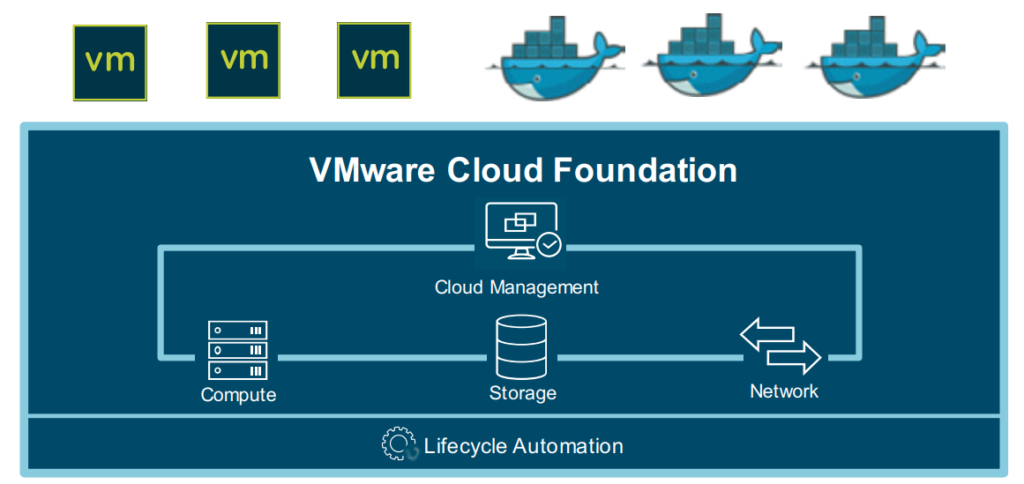
In November 2020 I wrote an article called “VMware Cloud Foundation And The Cloud Management Platform Simply Explained“. That piece was focused on the “why” and “when” VMware Cloud Foundation (VCF) makes sense for your organization. It also includes business values and hints that VCF is more than just about technology. Cloud Foundation is one of the most important drivers and THE enabler for to fulfill VMware’s multi-cloud strategy.
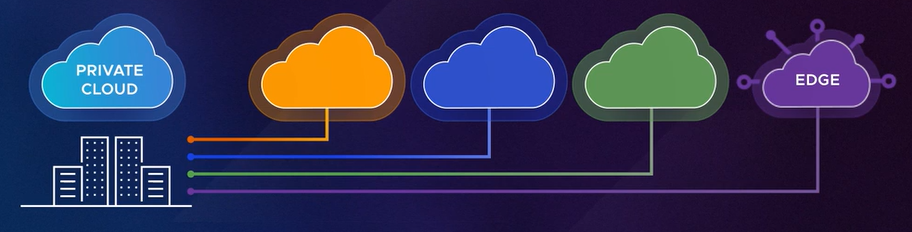
To summarize the two above mentioned articles, one can say, that VMware Cloud Foundation is a software-defined data center (SDDC) that can run in any cloud. In “any cloud” means that VCF can also be consumed as a service through other cloud provider partners like:
Additionally, Cloud Foundation and the whole SDDC can be consumed as a managed offering called DCaaS or LCaaS (Data Center / Local Cloud as a service).
Let’s say a customer is convinced that a “VCF everywhere” approach is right for them and starts building up private and public clouds based on VMware’s technologies. This means that VMware Cloud Foundation now runs in their private and public cloud.
Note: This doesn’t mean that the customer cannot use native public cloud workloads and services anymore. They can simply co-exist.
The customer is at a point now where they have achieved a consistent infrastructure. What’s up next? The next logical step is to use the same automation, management and security consoles to achieve consistent operations.
A traditional VMware customer goes for the vRealize Suite now, because they would need vRealize Automation (vRA) for automation and vRealize Operations (vROps) to monitor the infrastructure.
The next topic in this customer’s journey would be application modernization, which includes topics containerization and Kubernetes. VMware’s answer for this is the Tanzu portfolio. For the sake of this example let’s go with “Tanzu Standard”, which is one of four editions available in the Tanzu portfolio (aka VMware Tanzu).
Let’s have a look at the customer’s bill of materials so far:
VMware Cloud Foundation on-premises (vSphere, vSAN, NSX)
VMware Cloud on AWS
VMware Cloud on Dell EMC (locally managed VCF service for special edge use cases)
vRealize Automation
vRealize Operations
Tanzu Standard (includes Tanzu Kubernetes Grid and Tanzu Mission Control)
Looking at this list above, we see that their infrastructure is equipped with three different VMware Cloud Foundation flavours (on-prem, hyperscaler managed, locally managed) complemented by products of the vRealize Suite and the Tanzu portfolio.
This infrastructure with its different technologies, components and licenses has been built up over the past few years. But organizations are nowadays asking for more flexibility than ever. By flexibility I mean license portability and a subscription model.
VMware Cloud Universal
On 31st March 2021 VMware introduced VMware Cloud Universal (VMCU). VMCU is the answer to make the customer’s life easier, because it gives you the choice and flexibility in which clouds you want to run your infrastructure and consume VMware Cloud offerings as needed. It even allows you to convert existing on-premises VCF licenses to a VCF-subscription license.
The VMCU program includes the following technologies and licenses:
As Kit Kolbert, CTO VMware, said, “the idea is that VMware Cloud is everywhere that you want your applications to be”.
The VMware Cloud Console gives you view into all those different locations. You can quickly see what’s going on with a specific site or cloud landing zone, what its overall utilization looks like or if issues occur.
The Cloud Console has a seamless integration with vROps, which also helps you regarding capacity forecasting and (future) requirements (e.g., do I have enough capacity to meet my future demand?).
In short, it’s the central multi-cloud console to manage your global VMware Cloud environment.
vRealize Cloud Universal
What is part of vRealize Cloud Universal (vRCU) Enterprise Plus? vRCU is a SaaS management suite that combines on-premises and SaaS capabilities for automation, operations, log analytics and network visibility into a single offering. In other words, you get to decide where you want to deploy your management and operations tools. vRealize Cloud Universal comes in four editions and in VMCU you have the vRCU Enterprise Plus edition included with the following components:
Note: While vRCU standard, advanced and enterprise are sold as standalone editions today, the enterprise plus edition is only sold with VMCU (and as add-on to VMC on AWS).
vRealize AI Cloud
Have you ever heard of Project Magna? It is something that was announced at VMworld 2019, that provides adaptive optimization and a self-tuning engine for your data center. It was Pat Gelsinger who envisioned a so-called “self-driving data center”. Intelligence-driven data center might haven been a better term since Project Magna leverages artificial intelligence by using reinforcement learning, which combs through your data and runs thousands of scenarios that searches for the best regard output based on trial and error on the Magna SaaS analytics engine.
The first instantiation began with vSAN (today also known as vRAI Cloud vSAN Optimizer), where Magna will collect data, learn from it, and make decisions that will automatically self-tune your infrastructure to drive greater performance and efficiencies.
vRealize AI (vRAI) learns about your operating environments, application demands and adapts to changing dynamics, ensuring optimization per stated KPI. vRAI Cloud is only available on vRealize Operations Cloud via the vRealize Cloud Universal subscription.
VMware Skyline
VMware Skyline as a support service that automatically collects, aggregates, and analyzes product usage data, which proactively identifies potential problems and helps the VMware support engineers to improve the resolution time. Skyline is included in vRealize Cloud Universal because it just makes sense. A lot of customers have asked for unifying the self-service experience between Skyline and vRealize Operations Cloud. And many customers are using Skyline and vROps side by side today.
Users can now be proactive and perform troubleshooting in a single SaaS workflow. This means customers save more time by automating Skyline proactive remediations in vROps Cloud. But Skyline supports vSphere, vSAN, NSX, vRA, VCF and VMware Horizon as well.
VMware Cloud Universal Use Cases
As already mentioned, VMCU makes very much sense if you are building a hybrid or multi-cloud architecture with a consistent (VMware) infrastructure. VMCU, vRCU and the Tanzu portfolio help you to create a unified control plane for your cloud infrastructure.
Other use cases could be cloud migration or cloud bursting scenarios. If we switch back to the fictive customer before, we could use VMCU to convert existing VCF licenses to VCF-S (subscription) licenses, which in the end allow you to build a VMware-based Cloud on top of AWS (other public cloud providers are coming very soon!) for example.
Another good example is to achieve the same service and operating model on-prem as in the public cloud: a fully managed consumable infrastructure. Meaning, to move from a self-built and self-managed VCF infrastructure to something like VMC on Dell EMC.
How can I get VMCU?
There is no monthly subscription model and VMware only supports one-year or three-year terms. Customers will need to sign an Enterprise License Agreement (ELA) and purchase VMCU SPP credits.
Note: SPP credits purchased out of the program are not allowed to be used within the VMCU program!
After purchasing the VMCU SPP credits and VMware Cloud onboarding and organization setup, you can select the infrastructure offerings to consume your SPP credits. This can be done via the VMware Cloud Console.
Summary
I hope this article was useful to get a better understanding about VMware Cloud Universal. It might seem a little bit complex, but that’s not true. VMCU makes your life easier and helps you to build and license a globally distributed cloud infrastructure based on VMware technology.
On day 1 of VMworld 2021 we have heard and seen a lot of super exciting announcements. I believe everyone is excited about all the news and innovations VMware has presented so far.
I’m not going to summarize all the news from day 1 or day 2 but thought it might be helpful to have an overview of all the VMware projects that have been mentioned during the general session and solution keynotes.
Project Cascade
Project Cascade will provide a unified Kubernetes interface for both on-demand infrastructure (IaaS) and containers (CaaS) across VMware Cloud – available through an open command line interface (CLI), APIs, or a GUI dashboard. Project Cascade will be built on an open foundation, with the open-sourced VM Operator as the first milestone delivery for Project Cascade that enables VM services on VMware Cloud.
Project Capitola is a software-defined memory implementation that will aggregate tiers of different memory types such as DRAM, PMEM, NVMe and other future technologies in a cost-effective manner, to deliver a uniform consumption model that is transparent to applications.
Project Ensemble integrates and automates multi-cloud management with vRealize. This means that all the different VMware cloud management capabilities—self-service, elasticity, metering, and more—are in one place. You can access all the data, analytics, and workflows to easily manage your cloud deployments at scale.
Project Arctic is “the next evolution of vSphere” and is about bringing your own hardware while taking advantage of VMware Cloud offerings to enable a hybrid cloud experience. Arctic natively integrates cloud connectivity into vSphere and establishes hybrid cloud as the default operating model.
Project Monterey was announced in the VMworld 2020 keynote. It is about SmartNICs that will redefine the data center with decoupled control and data planes for management, networking, storage and security for VMware ESXi hosts and bare-metal systems.
I don’t remember anymore which session mentioned Project Iris but it is about the following:
Project Iris discovers and analyzes an organization’s full app portfolio; recommends which apps to rehost, replatform, or refactor; and enables customers to adapt their own transformation journey for each app, line of business, or data center.
Project Pacific
Project Pacific was announced at VMworld 2019. It is about re-architecting vSphere to integrate and embed Kubernetes and is known as “vSphere with Tanzu” (or TKGS) today. In other words, Project Pacific transformed vSphere into a Kubernetes-native platform with an Kubernetes control plane integrated directly into ESXi and vCenter. Pacific is part of the Tanzu portofolio.
Project Santa Cruz is a new integrated offering from VMware that adds edge compute and SD-WAN together to give you a secure, scalable, zero touch edge run time at all your edge locations. It connects your edge sites to centralized management planes for both your networking team and your cloud native infrastructure team. This solution is OCI compatible: if your app runs in a container, it can run on Santa Cruz.
So far, Project Dawn Patrol was only mentioned during the general session. “It will give you full visibility with a map of all your cloud assets and their dependencies”, Dormain Drewitz said.
Last year VMware introduced vSphere Bitfusion which allow shared access to a pool of GPUs over a network. Project Radium expands the fetature set of Bitfusion to other architectures and will support AMD, Graphcore, Intel, Nvidia and other hardware vendors for AI/ML workloads.
It was 2019 when VMware announced Tanzu and Project Pacific. A lot has happened since then and almost everyone is talking about application modernization nowadays. With my strong IT infrastructure background, I had to learn a lot of new things to survive initial conversations with application owners, developers and software architects. And in the same time VMware’s Kubernetes offering grew and became very complex – not only for customers, but for everyone I believe. 🙂
I already wrote about VMware’s vision with Tanzu: To put a consistent “Kubernetes grid” over any cloud
This is the simple message and value hidden behind the much larger topics when discussing application modernization and application/data portability across clouds.
The goal of this article is to give you a better understanding about the real value of VMware Tanzu and to explain that it’s less about Kubernetes and the Kubernetes integration with vSphere.
Application Modernization
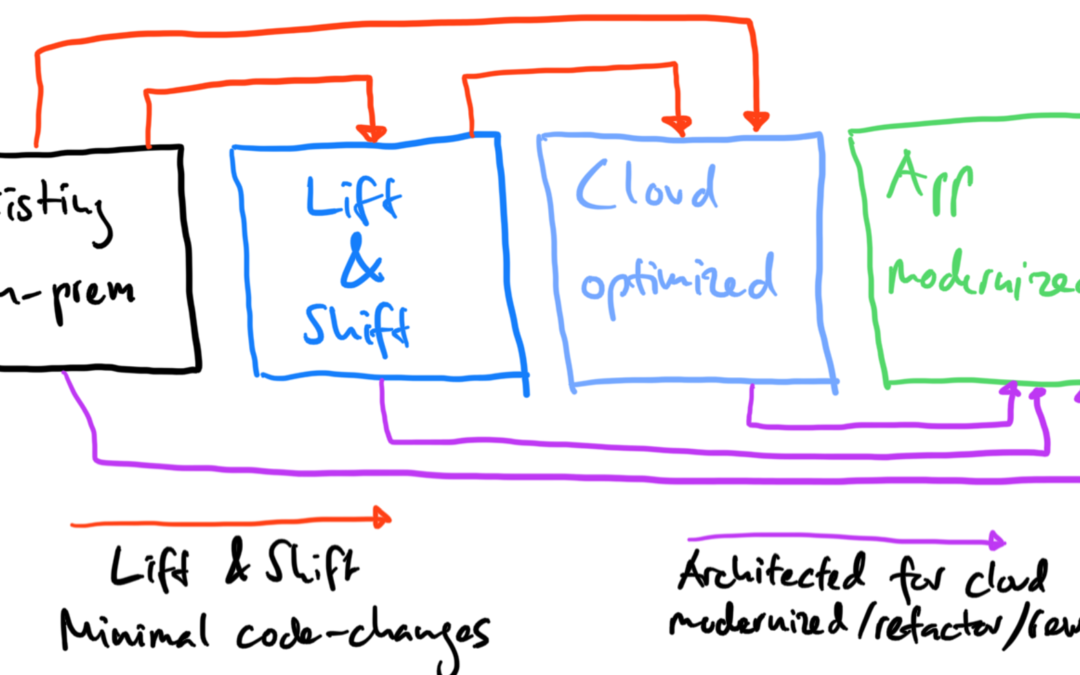
Before we can talk about the modernization of applications or the different migration approaches like:
Retain – Optimize and retain existing apps, as-is
Rehost/Migration (lift & shift) – Move an application to the public cloud without making any changes
Replatform (lift and reshape) – Put apps in containers and run in Kubernetes. Move apps to the public cloud
Rebuild and Refactor – Rewrite apps using cloud native technologies
Retire – Retire traditional apps and convert to new SaaS apps
…we need to have a look at the palette of our applications:
Big Data – Splunk, Elasticsearch, ELK stack, Greenplum, Kafka, Hadoop
In an app modernization discussion, we very quickly start to classify applications as microservices or monoliths. From an infrastructure point of view you look at apps differently and call them “stateless” (web apps) or “stateful” (SQL, NoSQL, Big Data) apps.
And with Kubernetes we are trying to overcome the challenges, which come with the stateful applications related to app modernization:
What does modernization really mean?
How do I define “modernization”?
What is the benefit by modernizing applications?
What are the tools? What are my options?
What has changed? Why is everyone talking about modernization? Why are we talking so much about Kubernetes and cloud native? Why now?
To understand the benefits (and challenges) of app modernization, we can start looking at the definition from IBM for a “modern app”:
“Application modernization is the process of taking existing legacy applications and modernizing their platform infrastructure, internal architecture, and/or features. Much of the discussion around application modernization today is focused on monolithic, on-premises applications—typically updated and maintained using waterfall development processes—and how those applications can be brought into cloud architecture and release patterns, namely microservices“
Modern applications are collections of microservices, which are light, fault tolerant and small. Microservices can run in containers deployed on a private or public cloud.
Which means, that a modern application is something that can adapt to any environment and perform equally well.
Note: App modernization can also mean, that you must move your application from .NET Framework to .NET Core.
I have a customer, that is just getting started with the app modernization topic and has hundreds of Windows applications based on the .NET Framework. Porting an existing .NET app to .NET Core requires some work, but is the general recommendation for the future. This would also give you the option to run your .NET Core apps on Windows, Linux and macOS (and not only on Windows).
A modern application is something than can run on bare-metal, VMs, public cloud and containers, and that easily integrates with any component of your infrastructure. It must be something, that is elastic. Something, that can grow and shrink depending on the load and usage. Since it is something that needs to be able to adapt, it must be agile and therefore portable.
Cloud Native Architectures and Modern Designs
If I ask my VMware colleagues from our so-called MAPBU (Modern Application Platform Business Unit) how customers can achieve application portability, the answer is always: “Cloud Native!”
Many organizations and people see cloud native as going to Kubernetes. But cloud native is so much more than the provisioning and orchestration of containers with Kubernetes. It’s a about collaboration, DevOps, internal processes and supply chains, observability/self-healing, continuous delivery/deployment and cloud infrastructure.
There are so many definitions around “cloud native”, that Kamal Arora from Amazon Web Services and others wrote the book “Cloud Native Architecture“, which describes a maturity model. This model helps you to understand, that cloud native is more a journey than only restrictive definition.
The adoption of cloud services and applying an application-centric design are very important, but the book also mentions that security and scalability rely on automation. And this for example could bring the requirement for Infrastructure as Code (IaC).
In the past, virtualization – moving from bare-metal to vSphere – didn’t force organizations to modernize their applications. The application didn’t need to change and VMware abstracted and emulated the bare-metal server. So, the transition (P2V) of an application was very smooth and not complicated.
And this is what has changed today. We have new architectures, new technologies and new clouds running with different technology stacks. We have Kubernetes as framework, which requires applications to be redesigned for these platforms.
That is the reason why enterprises have to modernize their applications.
One of the “five R’s” mentioned above is the lift and shift approach. If you don’t want or need to modernize some of your applications, but move to the public cloud in an easy, fast and cost efficient way, have a look at VMware’ hybrid cloud extension (HCX).
In this article I focus more on the replatform and refactor approaches in a multi-cloud world.
Kubernetize and productize your applications
Assuming that you also define Kubernetes as the standard to orchestrate your containers where your microservices are running in, usually the next decision would be about the Kubernetes “product” (on-prem, OpenShift, public cloud).
Looking at the current CNCF Cloud Native Landscape, we can count over 50 storage vendors and over 20 networks vendors providing cloud native storage and networking solutions for containers and Kubernetes.
Talking to my customers, most of them mention the storage and network integration as one of their big challenges with Kubernetes. Their concern is about performance, resiliency, different storage and network patterns, automation, data protection/replication, scalability and cloud portability.
Why do organizations need portability?
There are many use cases and requirements that portability (infrastructure independence) becomes relevant. Maybe it’s about a hardware refresh or data center evacuation, to avoid vendor/cloud lock-in, not enough performance with the current infrastructure or it could be about dev/test environments, where resources are deployed and consumed on-demand.
Multi-Cloud Application Portability with VMware Tanzu
To explore the value of Tanzu, I would like to start by setting the scene with the following customer use case:
On-premises: VMware vSphere infrastructure, no containerization yet, only legacy applications
In this case the customer is following a cloud-appropriate approach to define which cloud is the right landing zone for their applications. They decided to develop new applications in the public cloud and use the native services from Azure and AWS. The customers still has hundreds of legacy applications (monoliths) on-premises and didn’t decide yet, if they want to follow a “lift and shift and then modernize” approach to migrate a number applications to the public cloud.
But some of their application owners already gave the feedback, that their applications are not allowed to be hosted in the public cloud, have to stay on-premises and need to be modernized locally.
At the same time the IT architecture team receives the feedback from other application owners, that the journey to the public cloud is great on paper, but brings huge operational challenges with it. So, IT operations asks the architecture team if they can do something about that problem.
Both cloud operations for Azure and AWS teams deliver a different quality of their services, changes and deployments take longer with one of their public clouds, they have problems with overlapping networks, different storage performance characteristics and APIs.
Another challenge is the role-based access to the different clouds, Kubernetes clusters and APIs. There is no central log aggregation and no observability (intelligent monitoring & alerting). Traffic distribution and load balancing are also other items on this list.
Because of the feedback from operations to architecture, IT engineering received the task to define a multi-cloud strategy, that solves this operational complexity.
Notes: These are the regular multi-cloud challenges, where clouds are the new silos and enterprises have different teams with different expertise using different management and security tools.
This is the time when VMware’s multi-cloud approach Tanzu become very interesting for such customers.
Consistent Infrastructure and Management
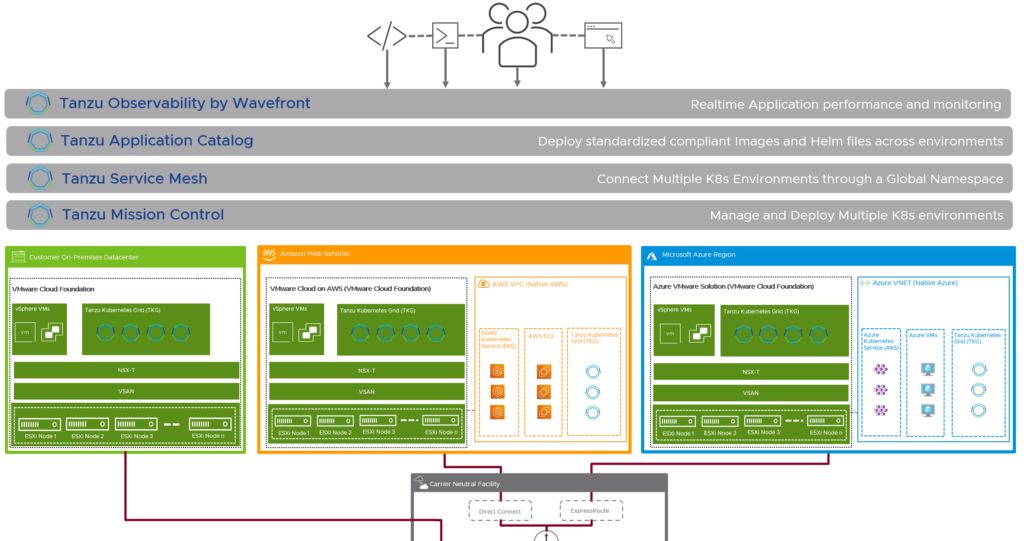
The first discussion point here would be the infrastructure. It’s important, that the different private and public clouds are not handled and seen as silos. VMware’s approach is to connect all the clouds with the same underlying technology stack based on VMware Cloud Foundation.
Beside the fact, that lift and shift migrations would be very easy now, this approach brings two very important advantages for the containerized workloads and the cloud infrastructure in general. It solves the challenge with the huge storage and networking ecosystem available for Kubernetes workloads by using vSAN and NSX Data Center in any of the existing clouds. Storage and networking and security are now integrated and consistent.
For existing workloads running natively in public clouds, customers can use NSX Cloud, which uses the same management plane and control plane as NSX Data Center. That’s another major step forward.
Consistent Application Platform and Developer Experience
Looking at organization’s application and container platforms, achieving consistent infrastructure is not required, but obviously very helpful in terms of operational and cost efficiency.
To provide a consistent developer experience and to abstract the underlying application or Kubernetes platform, you would follow the same VMware approach as always: to put a layer on top.
Here the solution is called Tanzu Kubernetes Grid (TKG), that provides a consistent, upstream-compatible implementation of Kubernetes, that is tested, signed and supported by VMware.
A Tanzu Kubernetes cluster is an opinionated installation of Kubernetes open-source software that is built and supported by VMware. In all the offerings, you provision and use Tanzu Kubernetes clusters in a declarative manner that is familiar to Kubernetes operators and developers. The different Tanzu Kubernetes Grid offerings provision and manage Tanzu Kubernetes clusters on different platforms, in ways that are designed to be as similar as possible, but that are subtly different.
VMware Tanzu Kubernetes Grid (TKG aka TKGm)
Tanzu Kubernetes Grid can be deployed across software-defined datacenters (SDDC) and public cloud environments, including vSphere, Microsoft Azure, and Amazon EC2. I would assume, that the Google Cloud is a roadmap item.
TKG allows you to run Kubernetes with consistency and makes it available to your developers as a utility, just like the electricity grid. TKG provides the services such as networking, authentication, ingress control, and logging that a production Kubernetes environment requires.
This TKG version is also known as TKGm for “TKG multi-cloud”.
VMware Tanzu Kubernetes Grid Service (TKGS aka vSphere with Tanzu)
TKGS is the option vSphere admins want to hear about first, because it allows you to turn a vSphere cluster to a platform running Kubernetes workloads in dedicated resources pools. TKGS is the thing that was known as “Project Pacific” in the past.
Once enabled on a vSphere cluster, vSphere with Tanzu creates a Kubernetes control plane directly in the hypervisor layer. You can then run Kubernetes containers by deploying vSphere Pods, or you can create upstream Kubernetes clusters through the VMware Tanzu Kubernetes Grid Service and run your applications inside these clusters.
VMware Tanzu Mission Control (TMC)
In our use case before, we have AKS and EKS for running Kubernetes clusters in the public cloud.
The VMware solution for multi-cluster Kubernetes management across clouds is called Tanzu Mission Control, which is a centralized management platform for the consistency and security the IT engineering team was looking for.
Available through VMware Cloud Services as SaaS offering, TMC provides IT operators with a single control point to provide their developers self-service access to Kubernetes clusters.
TMC also provides cluster lifecycle management for TKG clusters across environment such as vSphere, AWS and Azure.
It allows you to bring the clusters you already have in the public clouds or other environments (with Rancher or OpenShift for example) under one roof via the attachment of conformant Kubernetes clusters.
Not only do you gain global visibility across clusters, teams and clouds, but you also get centralized authentication and authorization, consistent policy management and data protection functionalities.
VMware Tanzu Observability by Wavefront (TO)
Tanzu Observability extends the basic observability provided by TMC with enterprise-grade observability and analytics.
Wavefront by VMware helps Tanzu operators, DevOps teams, and developers get metrics-driven insights into the real-time performance of their custom code, Tanzu platform and its underlying components. Wavefront proactively detects and alerts on production issues and improves agility in code releases.
TO is also a SaaS-based platform, that can handle the high-scale requirements of cloud native applications.
VMware Tanzu Service Mesh (TSM)
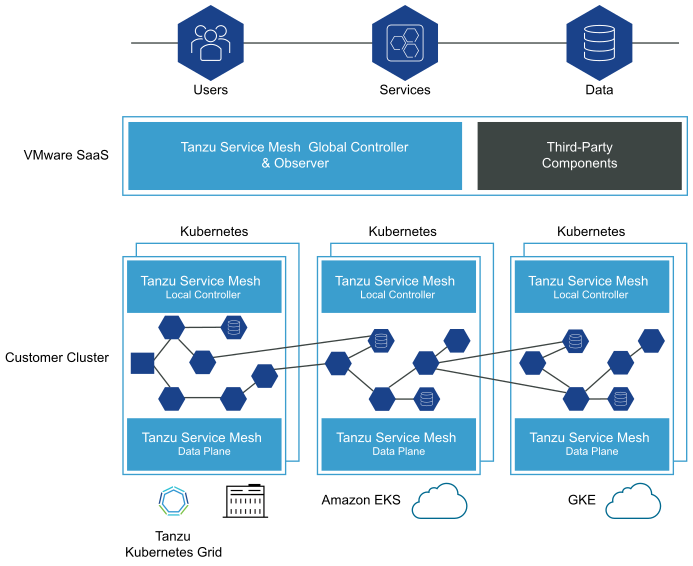
Tanzu Service Mesh, formerly known as NSX Service Mesh, provides consistent connectivity and security for microservices across all clouds and Kubernetes clusters. TSM can be installed in TKG clusters and third-party Kubernetes-conformant clusters.
Organizations that are using or looking at the popular Calico cloud native networking option for their Kubernetes ecosystem often consider an integration with Istio (Service Mesh) to connect services and to secure the communication between these services.
The combination of Calico and Istio can be replaced by TSM, which is built on VMware NSX for networking and that uses an Istio data plane abstraction. This version of Istio is signed and supported by VMware and is the same as the upstream version. TSM brings enterprise-grade support for Istio and a simplified installation process.
One of the primary constructs of Tanzu Service Mesh is the concept of a Global Namespace (GNS). GNS allows developers using Tanzu Service Mesh, regardless of where they are, to connect application services without having to specify (or even know) any underlying infrastructure details, as all of that is done automatically. With the power of this abstraction, your application microservices can “live” anywhere, in any cloud, allowing you to make placement decisions based on application and organizational requirements—not infrastructure constraints.
Note: On the 18th of March 2021 VMware announced the acquisition of Mesh7 and the integration of Mesh7’s contextual API behavior security solution with Tanzu Service Mesh to simplify DevSecOps.
Tanzu Editions
The VMware Tanzu portfolio comes with three different editions: Basic, Standard, Advanced
Tanzu Basic enables the straightforward implementation of Kubernetes in vSphere so that vSphere admins can leverage familiar tools used for managing VMs when managing clusters = TKGS
Tanzu Standard provides multi-cloud support, enabling Kubernetes deployment across on-premises, public cloud, and edge environments. In addition, Tanzu Standard includes a centralized multi-cluster SaaS control plane for a more consistent and efficient operation of clusters across environments = TKGS + TKGm + TMC
Tanzu Advanced builds on Tanzu Standard to simplify and secure the container lifecycle, enabling teams to accelerate the delivery of modern apps at scale across clouds. It adds a comprehensive global control plane with observability and service mesh, consolidated Kubernetes ingress services, data services, container catalog, and automated container builds = TKG (TKGS & TKGm) + TMC + TO + TSM + MUCH MORE
Tanzu Data Services
Another topic to reduce dependencies and avoid vendor lock-in would be Tanzu Data Services – a separate part of the Tanzu portfolio with on-demand caching (Tanzu Gemfire), messaging (Tanzu RabbitMQ) and database software (Tanzu SQL & Tanzu Greenplum) products.
Bringing all together
As always, I’m trying to summarize and simplify things where needed and I hope it helped you to better understand the value and capabilities of VMware Tanzu.
There are so many more products available in the Tanzu portfolio, that help you to build, run, manage, connect and protect your applications. In case you are interested to read more about VMware Tanzu, the have a look at my article 10 Things You Didn’t Know About VMware Tanzu.
IT organizations are looking for consistent operations, which is enabled by consistent infrastructure. Public cloud providers like AWS and Microsoft offer an extension of their cloud infrastructure and native services to the private cloud and edge, which is also known as Data Center as a Service.
Amazon Web Services (AWS) provides a fully managed service with AWS Outposts, that offers AWS infrastructure, AWS services, APIs and their tools to any data center or on-premises facility.
Microsoft has Azure Stack is even working on a new Azure Stack hybrid cloud solution that is codenamed “Fiji” to provide the ability to run Azure as a managed local cloud.
What do these offerings have in common or why would customers choose one (or even both) of these hybrid cloud options?
They bring the public cloud operation model to the private cloud or edge in form of one or more racks and servers provided as a fully managed service.
AWS Outposts (generally available since December 2019) and Azure Stack Fiji (in development) provide the following:
Extension of the public cloud services to the private cloud and edge
Consistent infrastructure with consistent operations
Local processing of data (e.g., analytics at the data source)
Local data residency (governance and security)
Low latency access to on-premises systems
Local migrations and modernization of applications with local system interdependencies
Build, run and manage on-premises applications using existing and familiar services and tools
Modernize applications on-prem resp. at the edge
Prescriptive infrastructure and vendor managed lifecycle and maintenance (racks and servers)
Creation of different physical pools and clusters depending on your compute and storage needs (different form factors)
Same licensing and pricing options on-premises (like in the public cloud)
The pretty new AWS Outposts or the future Azure Stack Fiji solution are also called “Local Cloud as a Service” (LCaaS) or “Data Center as a Service” and meant to be consumed and delivered in the on-prem data center or at the edge. It’s about bringing the public cloud to your data center or edge location.
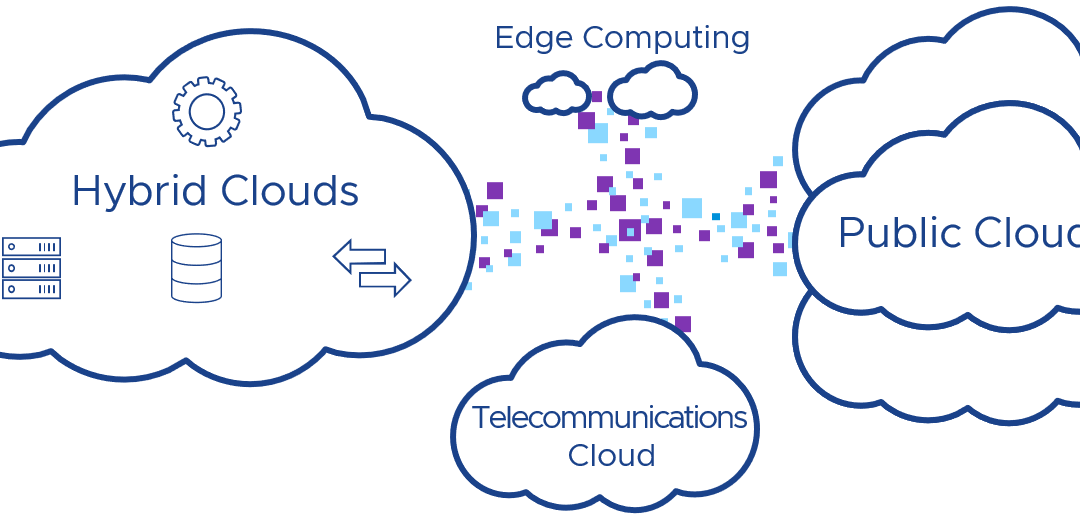
The next phase of cloud transformations is about the “edge” of an enterprise cloud and we know today that private and hybrid cloud strategies are critical for the implementation of IT infrastructure and the operation of it.
If you come from VMware’s standpoint, then it’s not about extending the public cloud to the local data centers. It’s about extending your VMware-based private cloud to the edge or the public cloud.
This article focuses on the local (private) cloud as a service options from VMware, not the public cloud offerings.
In case you would like to know more about VMware’s multi-cloud strategy, which is about running the VMware Cloud Foundation stack on top of a public cloud like AWS, Azure or Google, please check some of my recent posts.
Features and Technologies
Before I describe the different VMware LCaaS offerings based on VMware Cloud Foundation, let me show and explain the different features and technologies my customers ask about when they plan to build a private cloud with public cloud characteristics in mind.
I work with customers from different verticals like
finance
fast-moving consumer goods
manufacturing
transportation (travel)
which are hosting IT infrastructure in multiple data centers all over the world including hundreds of smaller locations. My customers belong to different vertical markets, but are looking for the same features and technologies when it comes to edge computing and delivering a managed cloud on-premises.
Compute and Storage. They are looking for pre-validated and standardized configuration offerings to meet their (application) needs. Most of them describe hardware blueprints with t-shirts sizes (small, medium, large). These different servers or instances provide different options and attributes, which should provide enough CPU, RAM, storage and networking capacity based on their needs. Usually you’ll find terms like “general purpose”, “compute optimized” or “memory optimized” node types or instances.
Networking. Most of my customers look for the possibility to extend their current network (aka elastic or cloud-scale networking) to any other cloud. They prefer a way to use the existing network and security policies and to provide software-defined networking (SDN) services like routing, firewalling and IDS/IPS, load balancing – also known as virtualized network functions (VNF). Service providers are also looking at network function virtualization (NFV), which includes emerging technologies like 5G and IoT. As cloud native or containerized applications become more important, service providers also discuss containerized network functions (CNF).
Services. Applications consist of one or many (micro-)services. All my conversations are application-centric and focus on the different application components. Most of my discussions are about containers, databases and video/data analytics at the edge.
Security. Customers, that are running workloads in the public cloud, are familiar with the shared responsibility model. The difference between public cloud and local cloud as a service offering is the physical security (racks, servers, network transits, data center access etc.).
Scalability and Elasticity. IT providers want to provide the simplicity and agility on-prem as their customers (the business) would expect it from a public cloud provider. Scalability is about a planned level of capacity that can grow or shrink as needed.
Resource Pooling and Sharing. Larger enterprises and service providers are interested in creating dedicated workload domains and resource clusters, but also look for a way to provide infrastructure multi-tenancy.
The challenge for today’s IT teams is, that edge locations are not often well defined. And these IT teams need an efficient way to manage different infrastructure sizes (can range from 2 nodes up to 16 or 24 nodes), for sometimes up to 400 edge locations.
Rethinking Private Clouds
Organizations have two choices when it comes to the deployment of a private cloud extension to the edge. They could continue using the current approach, which includes the design, deployment and operation of their own private cloud. Another pretty new option would be the subscription of a predefined “Data Center as a Service” offering.
Enterprises need to develop and implement a cloud strategy to support the existing workloads, which are still mostly running on VMware vSphere, and build something, which is vendor and cloud-agnostic. Something, that provides a (public) cloud exit strategy at the same time.
If you decide to go for AWS Outposts or the coming Azure Stack Fiji solution, which for sure are great options, how would you migrate or evacuate workloads to another cloud and technology stack?
VMware Cloud on Dell EMC
At VMworld 2019 VMware announced the general availability of VMware Cloud on Dell EMC (VMC on Dell EMC). In 2018 introduced as “Project Dimension”, the idea behind this concept was to deliver a (public) cloud experience to customers on-premises. Give customers the best of two worlds:
The simplicity, flexibility and cost model of the public cloud with the security and control of your private cloud infrastructure.
Initially, Project Dimension was focused primarily on edge use cases and was not optimized for larger data centers.
Note: This has changed with the introduction of the 2nd generation of VMC on Dell EMC in May 2020 to support different density and performance use cases.
VMC on Dell EMC is a VMware-managed service offering with these components:
A software-defined data center based von VMware Cloud Foundation (VCF) running on Dell EMC VxRail
ESXi, vSAN, NSX, vCenter Server
HCX Advanced
Dell servers, management & ToR switches, racks, UPS
Standby VxRail node for expansion (unlicensed)
Option for half or full-height rack
Multiple cluster support in a single rack
Clusters start with a minimum of 3 nodes (not 4 as you would expect from a regular VCF deployment)
VMware SD-WAN (formerly known as VeloCloud) appliances for remote management purposes only at the moment
Customer self-service provisioning through cloud.vmware.com
Maintenance, patching and upgrades of the SDDC performed by VMware
Maintenance, patching and upgrades of the Dell hardware performed by VMware (Dell provides firmware, drivers and BIOS updates)
1- or 3-year term subscription commitment (like with VMC on AWS)
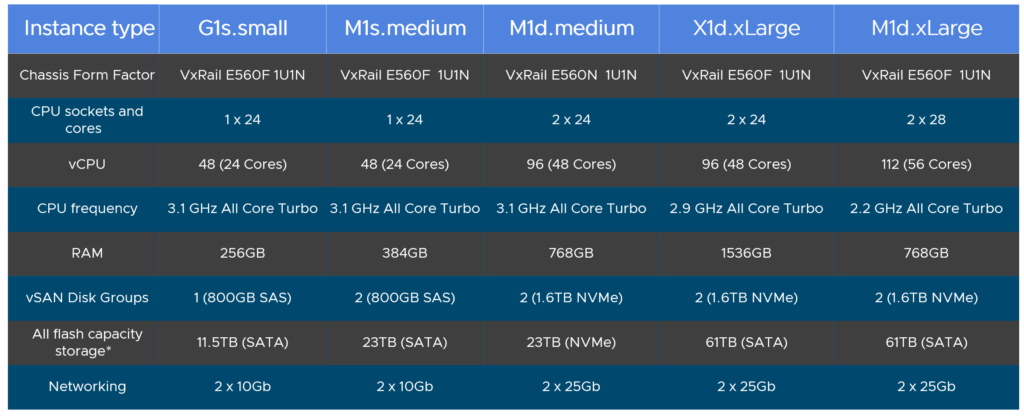
There is no “one size fits all” when it comes to hosting workloads at the edge and in your data centers. VMC on Dell EMC provides also different hardware node types, which should match with your defined t-shirt sizes (blueprints).
If we talk about at a small edge location with a maximum of 5 server nodes, you would go for a half-height rack. The full-height rack can host up to 24 nodes (8 clusters). Currently, the largest instance type would be a good match for high density, storage hungry workloads such as VDI deployments, databases or video analytics.
As HCX is part of the offering, you have the right tool and license included to migrate workloads between vSphere-based private and public clouds.
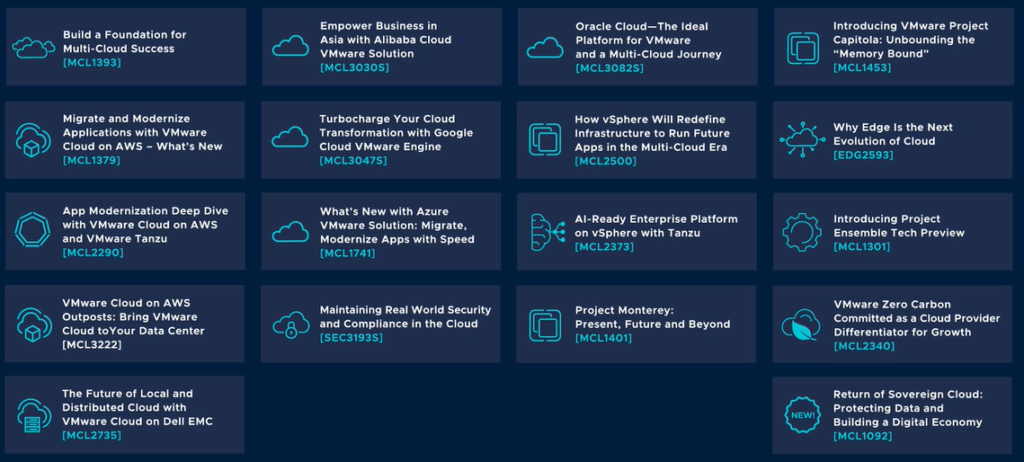
The following is a list of some VMworld 2020 breakout sessions presented by subject matter experts and focused on VMware Cloud on Dell EMC:
VMware Cloud Foundation and HPE Synergy with HPE GreenLake
At VMworld 2019 VMware announced that VMware Cloud Foundation will be offered in HPE’s GreenLake program running on HPE Synergy composable infrastructure (Hybrid Cloud as a Service). This gives VMware customers the opportunity to build a fully managed private cloud with the public cloud benefits in an on-premises environment.
HPE’s vision is built on a single platform that can span across multiple clouds and GreenLake brings the cloud consumption model to joint HPE and VMware customers.
Today, this solution is fully supported and sold by HPE. In case you want to know more, have a look at the VMworld 2020 session Simplify IT with HPE GreenLake Cloud Services and VMware from Erik Vogel, Global VP, Customer Experience, HPE GreenLake, Hewlett Packard Enterprise.
VMC on AWS Outposts
If you are an AWS customer and look for a consistent hybrid cloud experience, then you would consider AWS Outposts.
There is also VMware variant of AWS Outposts available for customers, who already run their on-premises workloads on VMware vSphere or in a cloud vSphere-based environment running on top of the AWS global infrastructure (called VMC on AWS).
VMware Cloud on AWS Outposts is a on-premises as-a-service offering based on VMware Cloud Foundation. It integrates VMware’s software-defined data center software, including vSphere, vSAN and NSX. Ths Cloud Foundation stack runs on dedicated elastic Amazon EC2 bare-metal infrastructure, delivered on-premises with optimized access to local and remote AWS services.
Key capabilities and use cases:
Use familiar VMware tools and skillsets
No need to rewrite applications while migrating workloads
Direct access to local and native AWS services
Service is sold, operated and supported by VMware
VMware as the single point of primary contact for support needs, supplemented by AWS for hardware shipping, installation and configuration
Host-level HA with automated failover to VMware Cloud on AWS
Resilient applications required to work in the event of WAN link downtime
Application modernization with access to local and native AWS services
1- or 3-year term subscription commitment
42U AWS Outposts rack, fully assembled and installed by AWS (including ToR switches)
Minimum cluster size of 3 nodes (plus 1 dark node)
Current cluster maximum of 16 nodes
Currently, VMware is running a VMware Cloud on AWS Outposts Beta program, that lets you try the pre-release software on AWS Outposts infrastructure. An early access program should start in the first half of 2021, which can be considered as a customer paid proof of concept intended for new workloads only (no migrations).
VMware on Azure Stack
To date there are no plans communicated by Microsoft or VMware to make Azure VMware Solution, the vSphere-based cloud offering running on top of Azure, available on-premises on the current or future Azure Stack family.
VMware on Google Anthos
To date there are no plans communicated by Google or VMware to make Google Cloud VMware Engine, the vSphere-based cloud offering running on top of the Google Cloud Platform (GCP), available on-premises.
The only known supported combination of a Google Cloud offering running VMware on-premises is Google Anthos (Google Kubernetes Engine on-prem).
Multi-Cloud Application Portability
Multi-cloud is now the dominant cloud strategy and many of my customers are maintaining a vSphere-based cloud on-premises and use at least two of the big three public clouds (AWS, Azure, Google).
Following a cloud-appropriate approach, customers are inspecting each application and decide which cloud (private or public) would be the best to run this application on. VMware gives customers the option to run the Cloud Foundation technology stack in any cloud, which doesn’t mean, that customers at the same time are not going cloud-native and still add AWS and Azure to the mix.
How can I achieve application portability in a multi-cloud environment when the underlying platform and technology formats differ from each other?
This is a question I hear a lot. Kubernetes is seen as THE container orchestration tool, which at the same time can abstract multiple public clouds and the complexity that comes with them.
A lot of people also believe that Kubernetes is enough to provide application portability and figure out later, that they have to use different Kubernetes APIs and management consoles for every cloud and Kubernetes (e.g., Rancher, Azure, AWS, Google, RedHat OpenShift etc.) flavor they work with.
That’s the moment we have to talk about VMware Tanzu and how it can simplify things for you.
The Tanzu portfolio provides the next generation the building blocks and steps for modernizing your existing workloads while providing capabilities of Kubernetes. Additionally, Tanzu also has broad support for containerization across the entire application lifecycle.
Tanzu gives you the possibility to build, run, manage, connect and protect applications and to achieve multi-cloud application portability with a consistent platform over any cloud – the so-called “Kubernetes grid”.
Note: I’m not talking about the product “Tanzu Kubernetes Grid” here!
I’m talking about the philosophy to put a virtual application service layer over your multi-cloud architecture, which provides a consistent application platform.
Tanzu Mission Control is a product under the Tanzu umbrella that provides central management and governance of containers and clusters across data centers, public clouds, and edge.
Conclusion
Enterprises must be able to extend the value of their cloud investments to the edge of the organization.
The edge is just one piece of a bigger picture and customers are looking for a hybrid cloud approach in a multi-cloud world.
Solutions like VMware Cloud on Dell EMC or running VCF on HPE Synergy with HPE Greenlake are only the first steps towards innovation in the private cloud and to bring the cost and operation model from the public cloud to the enterprises on-premises.
IT organizations are rather looking for ways to consume services in the future and care less about building the infrastructure or services by themselves.
The two most important differentiators for selecting an as-a-service infrastructure solution provider will be the provider’s ability to enable easy/consistent connectivity and the provider’s established software partner portfolio.
In cases where IT organizations want to host a self-managed data center or local cloud, you can expect, that VMware is going to provide a new and appropriate licensing model for it.
One of the reasons and one of the essential characteristics of a cloud computing model I mentioned is resource pooling.
By the National Institute of Standards and Technology (NIST) resource pooling is defined with the following words:
The provider’s computing resources are pooled to serve multiple consumers using a multi-tenant model, with different physical and virtual resources dynamically assigned and reassigned according to consumer demand. There is a sense of location independence in that the customer generally has no control or knowledge over the exact location of the provided resources but may be able to specify location at a higher level of abstraction (e.g., country, state, or data center).
This time I would like to focus on multi-tenancy and how you can achieve that on top of VMware Cloud Foundation (VCF) with Cloud Director (formerly known as vCloud Director) and vRealize Automation, which both could be part of a VMware cloud management platform (CMP).
Multi-Tenancy
There are many understandings around about multi-tenancy and different people have different definitions for it.
If we start from the top of an IT infrastructure, we will have application or software multi-tenancy with a single instance of an application serving multiple tenants. And in the past even running on the same virtual or physical server. In this case the multi-tenancy feature is built into the software, which is commonly accessed by a group of users with specific permissions. Each tenant gets a dedicated or isolated share of this application instance.
Coming from the bottom of the data center, multi-tenancy describes the isolation of resources (compute, storage) and networks to deliver applications. The best example here are (cloud) services providers.
Their goal is to create and provide virtual data centers (VDC) or a virtual private cloud (VPC) on top of the same physical data center infrastructure – for different tenants aka customers. Normally, the right VMware solution for this requirement and service providers would be Cloud Director, but this is maybe not completely true anymore with the release of vRealize Automation 8.x.
To make it easier for all of us, I’ll call Cloud Director and vCloud Director “vCD” from now on.
VMware Cloud Director (formerly vCloud Director)
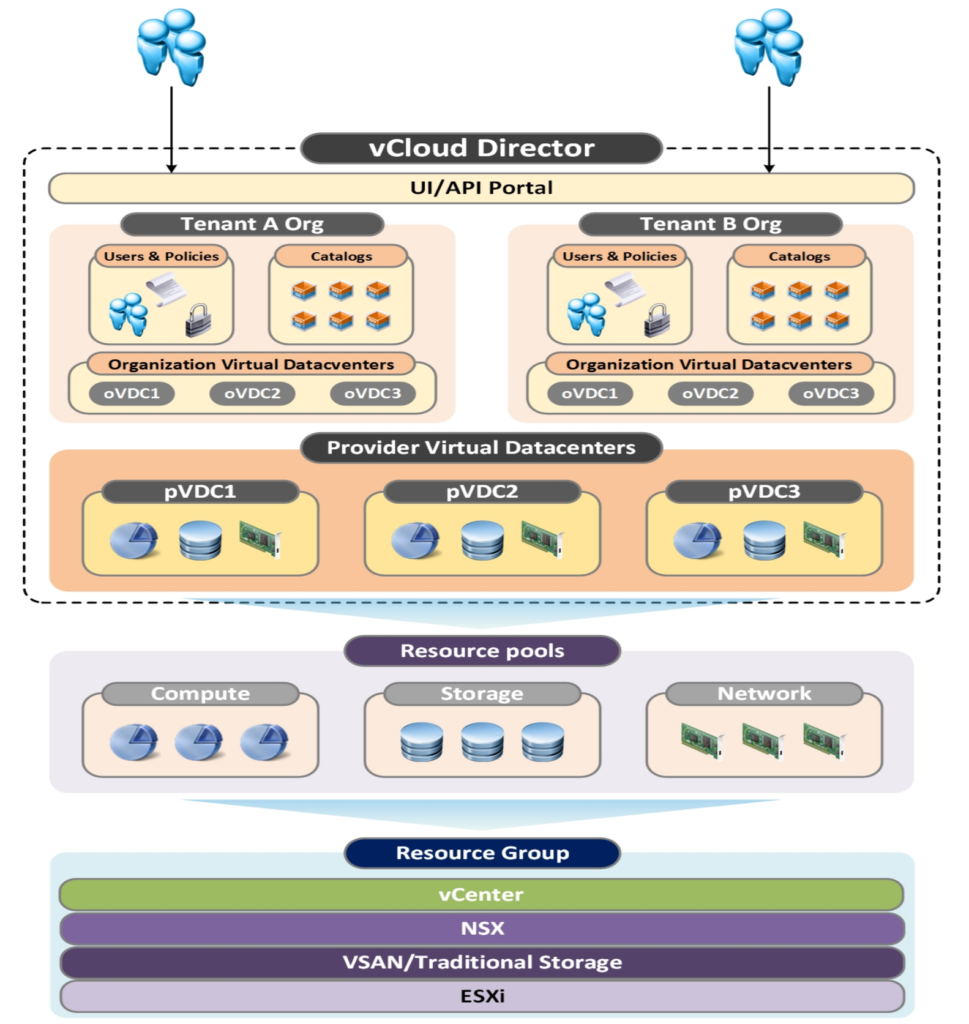
Cloud Director is a product exclusively for cloud service providers via the VMware Cloud Provider Program (VCPP). Originally released in 2010, it enables service providers (SPs) to provision SDDC (Software-Defined Data Center) services as complete virtual data centers. vCD also keeps resources from different tenants isolated from each other.
Within vCD a unit of tenancy is called Organization VDC (OrgVDC). It is defined as a set of dedicated compute (CPU, RAM), storage and network resources. A tenant can be bound to a single OrgVDC or can be composed of multiple Organization VDCs. This is typically known as Infrastructure as a Service (IaaS).
A provider virtual data center (PVDC) is a grouping of compute, storage, and network resources from a single vCenter Server instance. Multiple organizations/tenants can share provider virtual data center resources.
Important: I assume that you are familiar with VCF, its core components (ESXi, vSAN, NSX, SDDC Manager) and architecture models (standard as the preferred).
Cloud Director components are currently not part of the VCF lifecycle automation, but it is a roadmap item!
Cloud Director Resource Hosting Models
vCD offers multiple hosting models:
In the shared hosting model, multiple tenant workloads run all together on the same resource groups without any performance assurance
In the reserved hosting model, performance of workloads is assured by resource reservation.
In the physical hosting model, hardware is dedicated to a single tenant and performance is assured by the allocated hardware
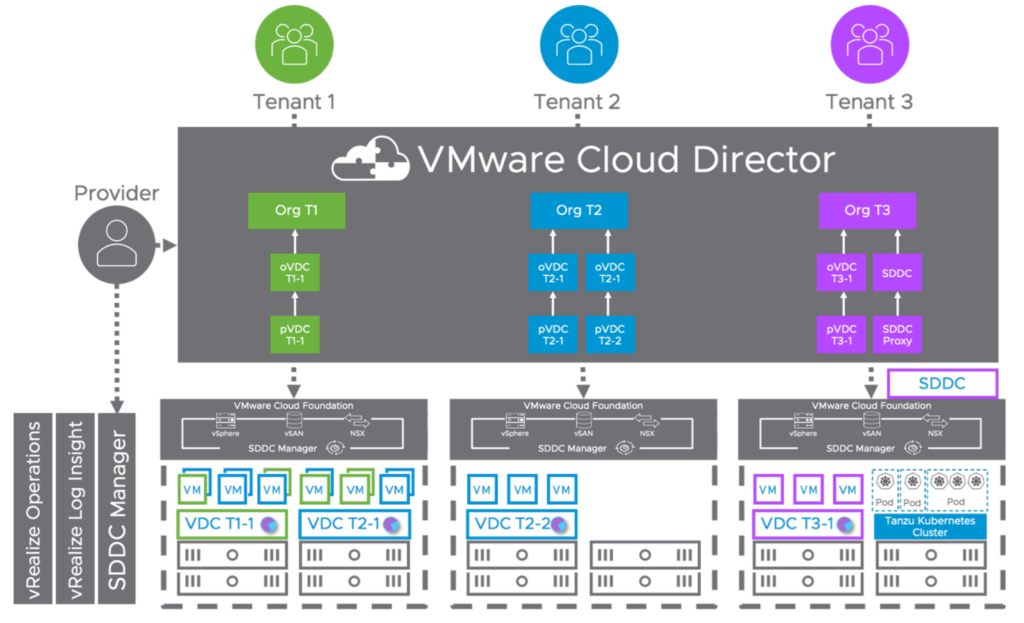
Tenant Using Shared Hosting on VCF Workload Domain
In this use case a tenant is using shared hosting backed by a VMware Cloud Foundation workload domain. A workload domain, which is mapped to a provider VDC.
Tenant Using Shared Hosting and Reserved Hosting on Multiple VCF Workload Domains
This use case describes the example of customer using shared and reserved hosting backed by multiple VCD workload domains. Here each cluster has a single resource pool mapped to a single PVDC.
Tenant Using Physical Hosting and Central Point of Management (CPOM)
The last example shows a single customer using physical hosting. You will notice that there is also a vSphere with Kubernetes workload domain. VMware Cloud Foundation automates the installation of vSphere with Kubernetes (Tanzu) which makes it incredibly easy to deploy and manage.
You can see that there is an “SDDC” box on top of the Kubernetes Cluster vCenter, which is attached to the “SDDC Proxy” entity. vCD can act as an HTTP/S proxy server between tenants and the underlying vSphere environment in VMware Cloud Foundation. An SDDC proxy is an access point to a component from an SDDC, for example, a vCenter Server instance, an ESXi host, or an NSX Manager instance.
The vCD becomes the central point of management (CPOM) in this case and the customer gets a complete dedicated SDDC with vCenter access.
Note: Since vCD 9.7 it is possible to present for example a vCenter Server instance securely to a tenant’s organization using the Cloud Director user interface. This is how you could build your own VMC-on-AWS-like cloud offering!
All 3 Tenants Together
Finally, we put it all together. In the first use case we can see that different customers are sharing resources from a single PVDC. We can also see that resources from a single vCenter can be split across different provider virtual datacenters and that we can mix and match multi-tenants workload domains and workload domains offering dedicated private cloud all together.
Cloud Director Service and VMware Cloud on AWS
If you don’t want to extend or operate your own data center or cloud infrastructure anymore and provide a managed service to multiple customer, there are still options for you available backed by VMware Cloud Foundation as well.
VMware sees not only new, but also existing VCPP partners moving towards a mixed-asset portfolio, where their cloud management platform consists of a VCPP and MSP (VMware SaaS offerings) contract. This allows them for example to run vCD on-premises for their current customers and the onboarding of new tenants would happen in the public cloud with CDS and VMC on AWS.
Enterprise Multi-Tenancy with vRealize Automation
With the release of vRealize Automation 8.1 (vRA) VMware offered support for dedicated infrastructure multi-tenancy, created and managed through vRealize Suite Lifecycle Manager. This means vRealize Automation enables customers or IT providers to set up multiple tenants or organizations within each deployment.
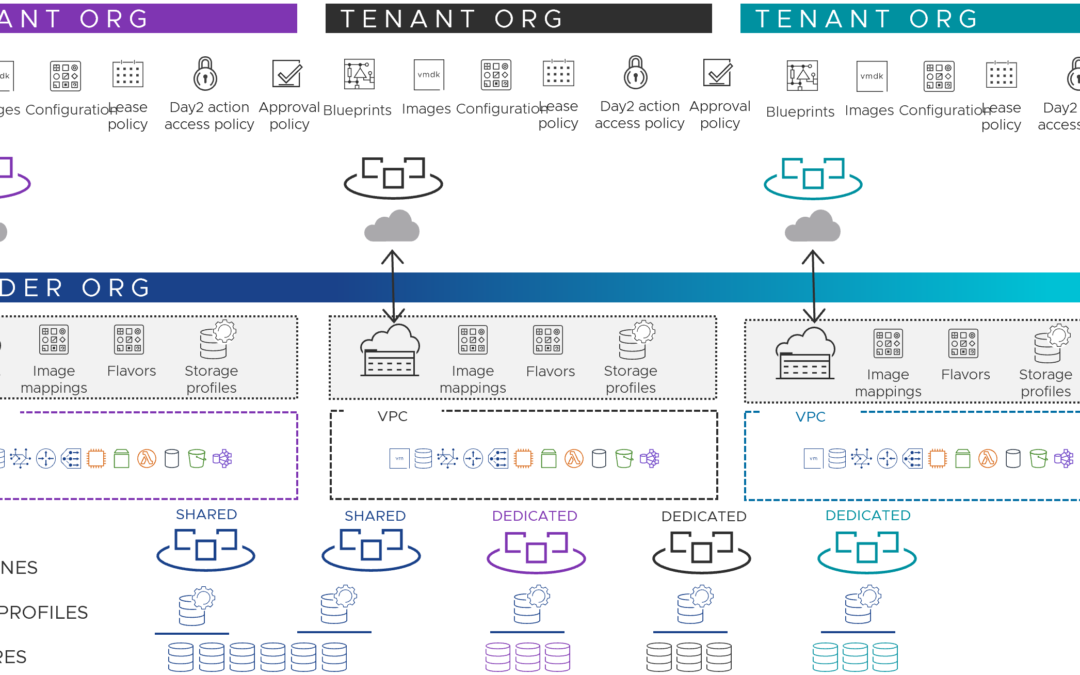
Providers can set up multiple tenant organizations and allocate infrastructure. Each tenant manages its own projects (team structures), resources and deployments.
Enabling tenancy creates a new Provider (default) organization. The Provider Admin will create new tenants, add tenant admins, setup directory synchronization, and add users. Tenant admins can also control directory synchronization for their tenant and will grant users access to services within their tenant. Additionally, tenant admins will configure Policies, Governance, Cloud Zones, Profiles, access to content and provisioned resources; within their tenant. A single shared SDDC or separate SDDCs can be used among tenants depending on available resources.
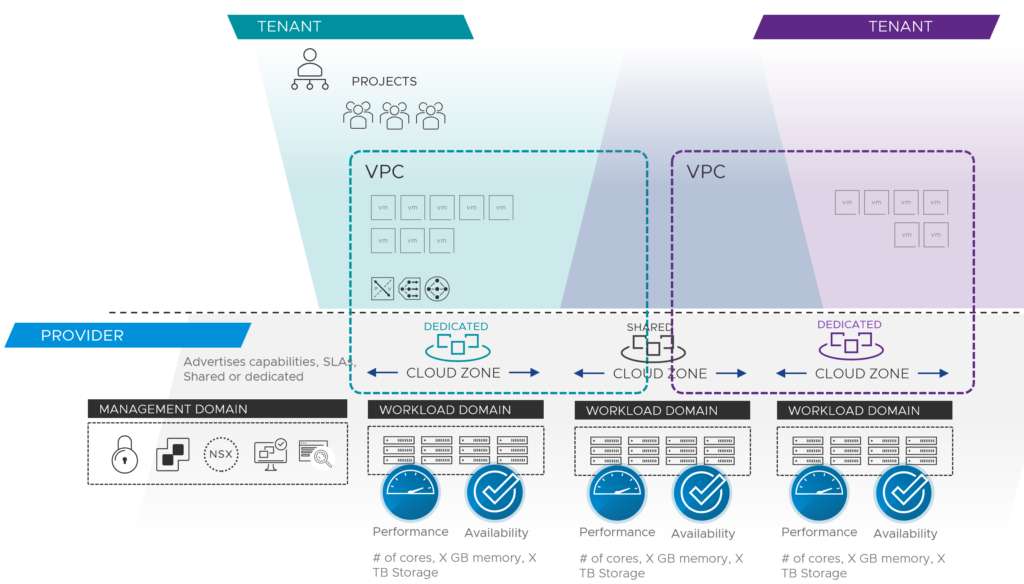
With vRealize Automation 8.2, provider administrators got the ability to share infrastructure by creating and assigning Virtual Private Zones (VPZ) to tenant organizations.
Think of VPZs as a kind of container of infrastructure capacity and services which can be defined and allocated to a Tenant. You can add unique or shared cloud accounts, with associated compute, flavors, images, storage, networking, and tags to each VPZ. Each component offers the same configuration options you would see for a standalone configuration.
vRealize Automation and VMware Cloud Foundation
With the pretty new multi-tenancy and VPZ capability a new consumption model on top of VCF can be built. You (provider) would map the Cloud Zones (compute resources on vSphere (or AWS for example)) to a VCF workload domain.
The provider sets these cloud zones up for their customers and provides dedicated or shared infrastructure backed by Cloud Foundation workload domains.
This combination would allow you to build an enterprise VPC construct (like AWS for example), a logically isolated section of your provider cloud.
SDDC Manager Integration and VMware Cloud Foundation (VCF) Cloud Account
Since the vRA 8.2 release customers are also able to configure a SDDC Manager integration and on-board workload domains as VMware Cloud Foundation cloud accounts into the VMware Cloud Assembly service.
VMware Cloud Director or vRealize Automation?
You wonder if vRealize Automation could replace existing vCD installations? Or if both cloud management platforms can do the same?
I can assure you, that you can provide a self-service provisioning experience with both solutions and that you can provide any technology or cloud service “as a service”. Both have in common to be backed by Cloud Foundation, have some form of integration (vRA) and can be built by a VMware Validated Design (VVD).
vCD is known to be a service provider solution, where vRA is more common in enterprise environments. VMware has VCPP partners, that use Cloud Director for their external customers and vRealize Automation for their internal IT and customers.
If you are looking for a “cloud broker” and Infrastructure as Code (IaC), because you also want to provision workloads on AWS, Azure or GCP as well, then vRealize Automation is the better solution since vCD doesn’t offer this deep integration and these deployment options yet.
Depending on your multi-tenant needs and if you for example only have chosen vCD in the past, because of the OrgVDC and resource pooling feature, vRealize Automation would be enough and could replace vCD in this case.
It is also very important to understand how your current customer onboarding process and operational model look like:
How do you want to create a new tenant?
How do you want to onboard/migrate existing customer workloads to your provider infrastructure?
Do you need versioning of deployments or templates?
Do customers require access to the virtual infrastructure (e.g. vCenter or OrgVDC) or do you just provide SaaS or PaaS?
Do customers need a VPN or hybrid cloud extension into your provider cloud?
How would you onboard non-vSphere customers (Hyper-V, KVM) to your vSphere-based cloud?
Does your customer rely on other clouds like AWS or Azure?
How do you do billing for your vSphere-based cloud or multi-cloud environment?
What is your Kubernetes/container strategy?
And 100 other things 😉
There are so many factors and criteria to talk about, which would influence such a decision. There is no right or wrong answer to the question, if it should be VMware Cloud Director or vRealize Automation. Use what makes sense.
For me, this was the biggest and most important announcement from this year’s VMworld. It is a new offering, which is relevant for every vSphere customer out there – even the small and medium enterprises, which maybe still just rely on ESXi and vCenter only for their environment.
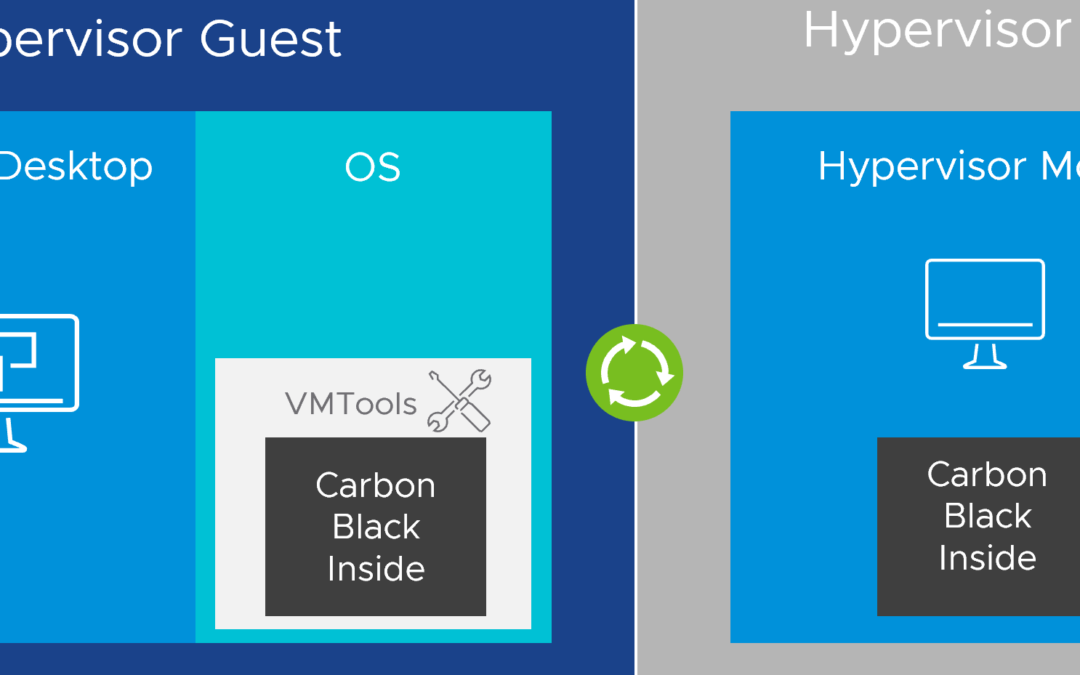
CBC Workload introduces protection for workloads in private and public clouds. For vSphere, there is no additional agent installation needed, because the Carbon Black sensor (agent) is built into vSphere. That’s why you may hear that this solution is “agentless”.
Carbon Black Cloud Workload Bundles
This cloud-native (SaaS) solution provides foundational workload hardening and vulnerability management combined with prevention, detection and response capabilities to protect workloads running in virtualized private cloud and hybrid cloud environments.
Note: Customers, that are using vSphere and VMware Horizon, should take a look at Workspace Security VDI, which has also been announced at VMworld 2020. A single-vendor solution with the combination of VMware Horizon and Carbon Black.
If you would like to know more about the interoperability of Carbon Black and Horizon, have a look at KB79180.
Carbon Black Cloud Workload Overview
Customers and partners have now the possibility to provide a workload security solution for Windows and Linux virtual machines. The complete system requirements can be found here.
“You can enable Carbon Black in your data center with an easy one-click deployment. To minimize your deployment efforts, a lightweight Carbon Black launcher is made available with VMware Tools. Carbon Black launcher must be available on the Windows and Linux VMs.”
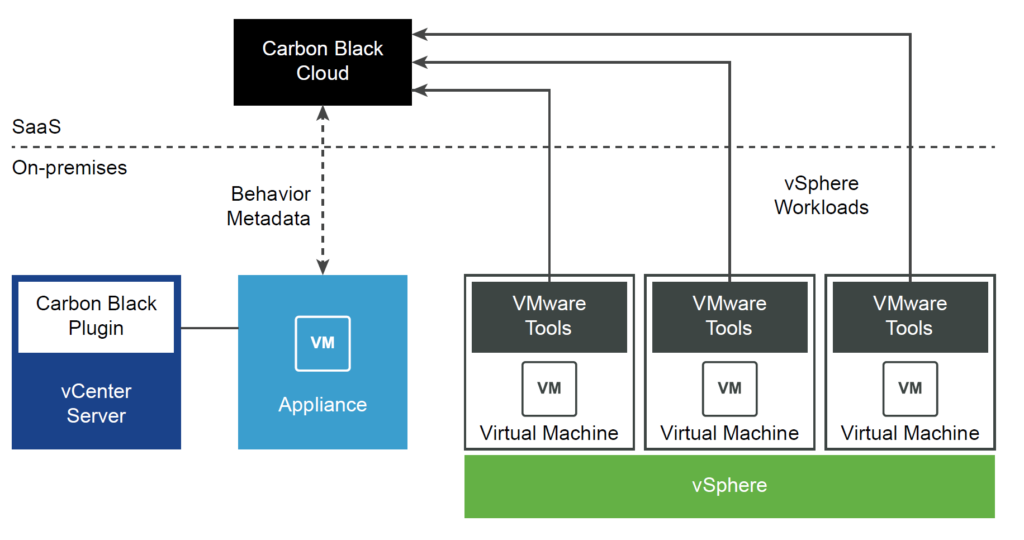
Carbon Black Cloud Workload consists of a few key components that interact with each other:
You must first deploy an on-premises OVF/OVA template for the Carbon Black Cloud Workload appliance (4 vCPU, 4GB RAM, 41GB storage) that connects the Carbon Black Cloud to the vCenter Server through a registration process. After the registration is complete, the Carbon Black Cloud Workload appliance deploys the Carbon Black Cloud Workload plug-in and collects the inventory from the vCenter Server.
The plug-in provides visibility into processes and network connections running on a virtual machine.
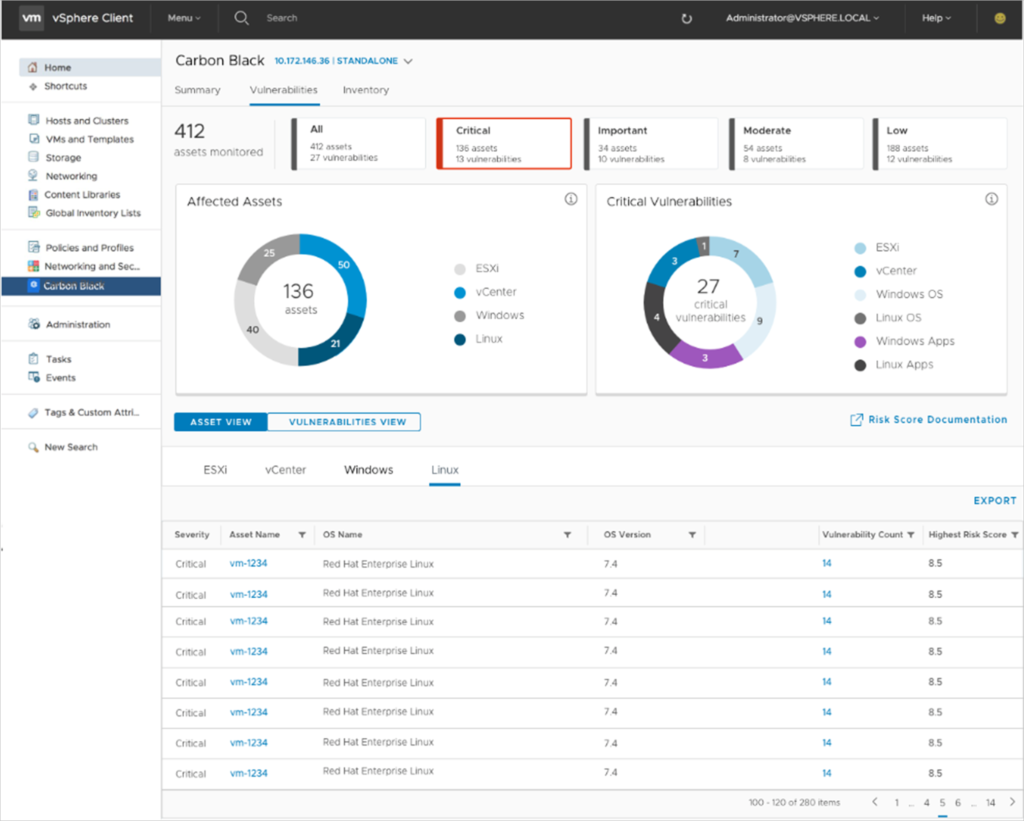
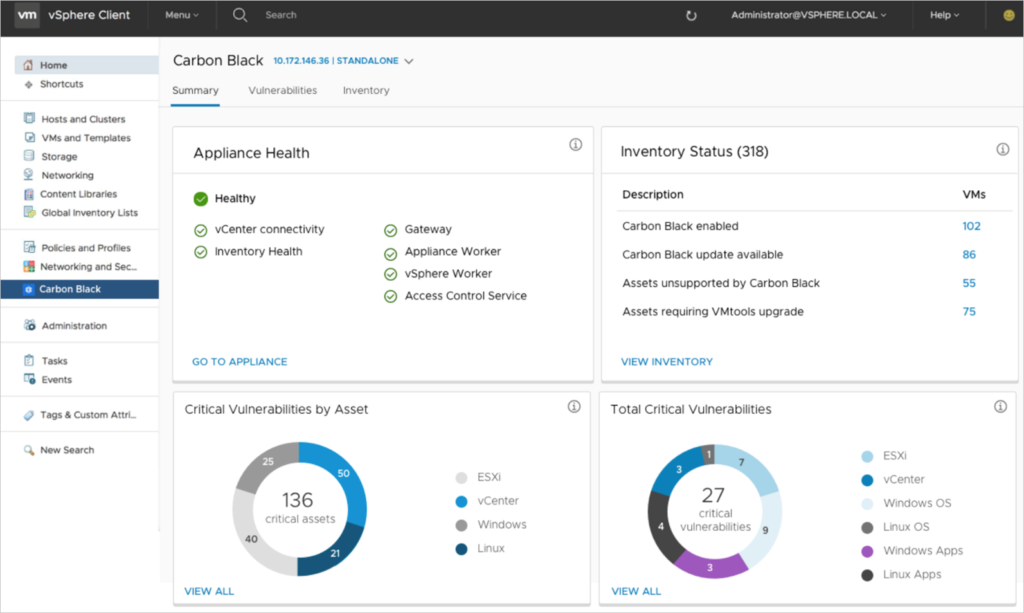
As a vCenter Server administrator, you want to have visibility of known vulnerabilities in your environment to understand your security posture and schedule maintenance windows for patching and remediation. With the help of vulnerability assessment, you can proactively minimize the risk in your environment. You can now monitor known vulnerabilities from the Carbon Black Cloud Workload plug-in:
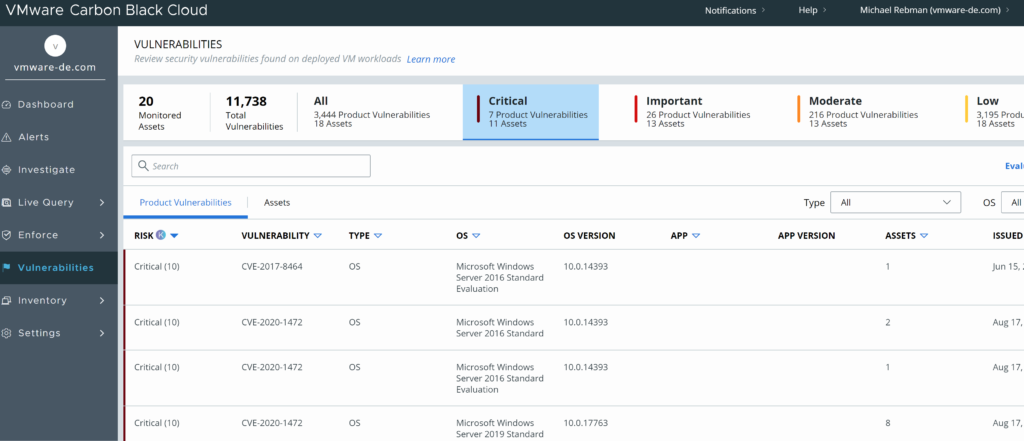
The infosec guys in your company would do the vulnerability assessment from the CBC console:
Carbon Black Cloud Workload protection provides vSphere administrators a full inventory, appliance health and vulnerability reporting from one console, the already well-known vSphere Client.
Recover – Templates / Code Review, Shift Left / Pipeline, Exceptions and Verification
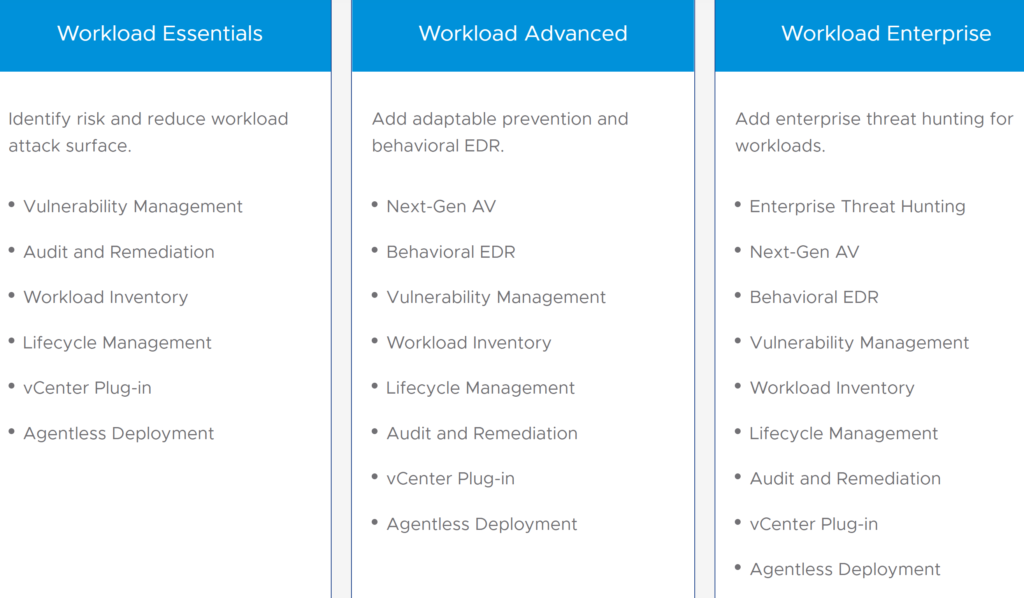
CBC Workload focuses on identifying the risks with workload visibility and vulnerability management, which are part of the “Workload Essentials” edition.
If you would like to prevent malicious activities to protect your workloads and replace your existing legacy anti-virus (AV) solution, then “Workload Advanced” would be the right edition for you as it includes Next-Gen AV (NGAV).
Behavioral EDR (Endpoint Detection & Response), also part of the “Advanced” bundle, belongs to “detect & respond” of the security lifecycle.
Workload Security for Kubernetes
You just learned that Carbon Black Cloud gives workload protection for virtualized Windows or Linux virtual machines running on vSphere. What about container security for Kubernetes?
In May 2020 VMware officially closed its acquisition of Octarine, a SaaS security platform for protecting containers and Kubernetes. VMware bought Octarine to enable Carbon Black to secure applications running in Kubernetes.
Traditional security is no longer relevant for the security of Kubernetes, because Kubernetes is so powerful and hence risky, networking is very complex and a total different game, because static IPs and ports are no longer relevant. And you need a new security approach which is compatible with IT’s organizational shift from traditional to a DevSecOps approach.
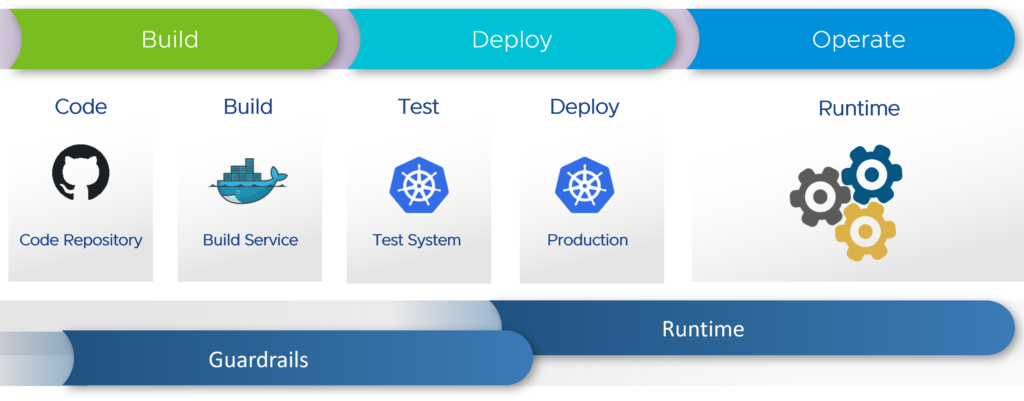
VMware’s solution covers the whole lifecycle of the application from building the container to the app running in production. It is a two-part solution with the first one being “Guardrails“. It is able to scan container images for vulnerabilities and Kubernetes manifests for any misconfigurations.
The second part is runtime protection. When the workloads are deployed in production, the Carbon Black security agent is able to detect malicious activities.
Let’s have a look at the different features the Kubernetes “Guardrails” provide for each phase of the application:
Deploy: Policy governance, compliance reporting, visibility and hardening
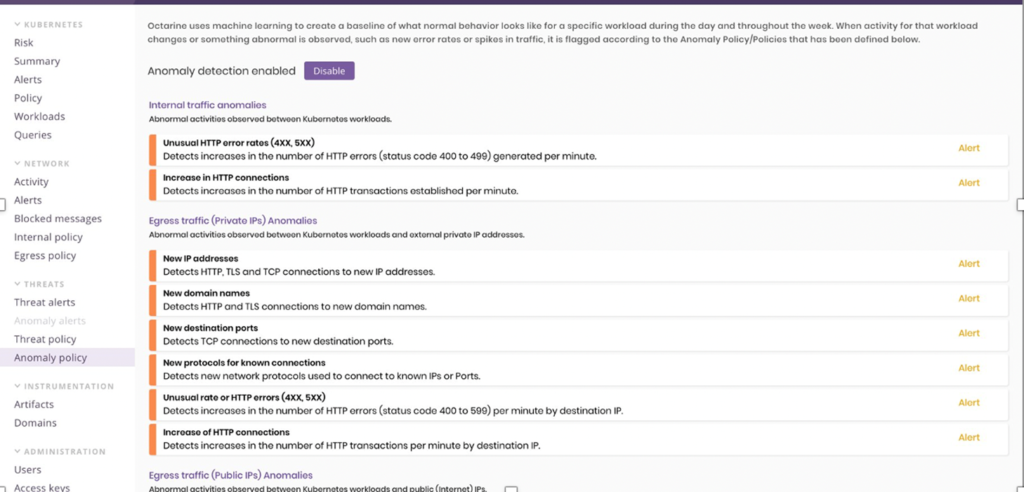
Operate: Threat detection and response, anomaly detection and least privilege runtime, event monitoring
And these were the key capabilities and benefits, which have been mentioned at VMworld 2020 for “Guardrails”:
For “runtime” security the following key capabilities and benefits were mentioned:
Visibility of network traffic
Coverage of workloads and hosts activity
Network policy management
Threat detection
Anomaly detection
Egress security
SIEM integration
Customers will be able to have visibility of all the workloads running in the local or cloud-native production clusters and how they interact with each other. They will also see which services are exposed to ingress traffic, which services are exiting the cluster and where this egress traffic is going to. It is also going to be visible which communication is encrypted and what type of encryption is used.
Note: The Carbon Black Cloud module for hardening and securing Kubernetes workloads is expected to be generally available until the end of 2020.
The launch of Carbon Black Workload was the first important step to let the intrinsic security vision become more a reality (after VMware acquired Carbon Black). Moving on with Kubernetes and bringing new container security capabilities is going to be the next big move forward, that VMware can become a major security provider.
Stay tuned for more security announcements!
Additional Resources
If you would like to know more about Carbon Black Cloud Workload and security for Kubernetes, have a look at:
My name is Michael Rebmann. I am an Enterprise Account Manager at Nutanix, helping public sector organizations design sovereign and compliant cloud infrastructures. I focus on sovereign cloud, hybrid multi-cloud architectures, and data privacy in regulated industries.
The views and opinions expressed here are entirely my own, reflecting my journey and insights.


 vRealize AI (vRAI) learns about your operating environments, application demands and adapts to changing dynamics, ensuring optimization per stated KPI. vRAI Cloud is only available on vRealize Operations Cloud via the vRealize Cloud Universal subscription.