Supercloud – A Hybrid Multi-Cloud

Supercloud – A Hybrid Multi-Cloud

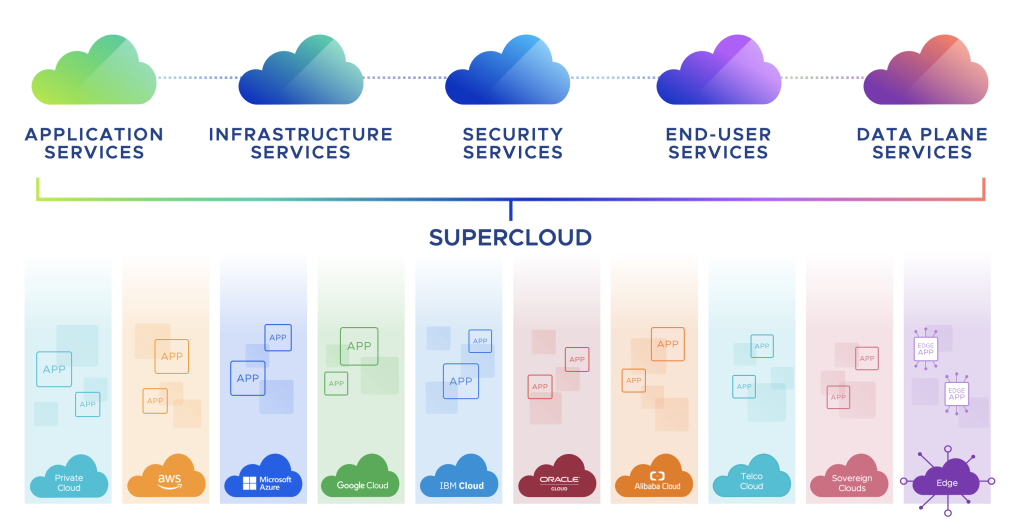
I thought it is time to finally write a piece about superclouds. Call it supercloud, the new multi-cloud, a hybrid multi-cloud, cross-cloud, or a metacloud. New terms with the same meaning. I may be biased but I am convinced that VMware is in the pole position for this new architecture and approach.

Let me also tell you this: superclouds are nothing new. Some of you believe that the idea of a supercloud is something new, something modern. Some of you may also think that cross-cloud services, workload mobility, application portability, and data gravity are new complex topics of the “modern world” that need to be discussed or solved in 2023 and beyond. Guess what, most of these challenges and ideas exist for more than 10 years already!

Cloud-First is not cool anymore

There is clear evidence that a cloud-first approach is not cool or the ideal approach anymore. Do you remember about a dozen years ago when analysts believed that local data centers are going to disappear and the IT landscape would only consist of public clouds aka hyperscalers? Have a look at this timeline:
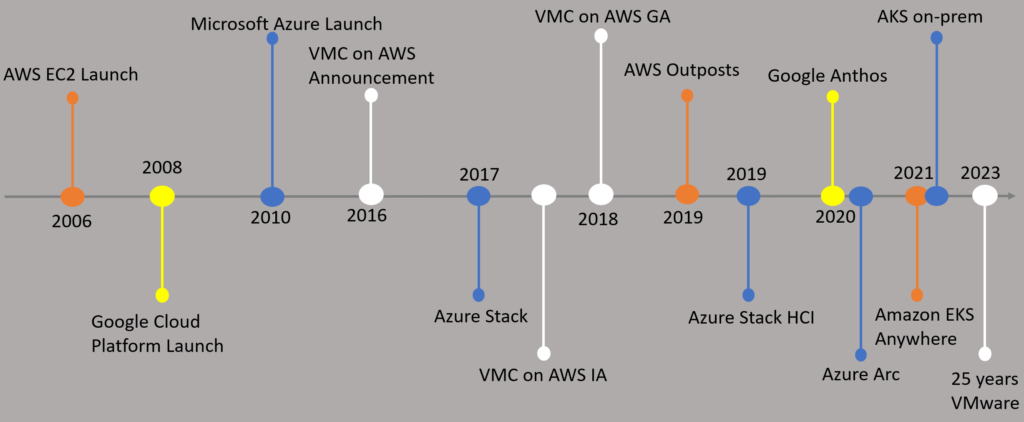
VMware and Public Clouds Timeline

We can clearly see when public clouds like AWS, Google Cloud, and Microsoft Azure appeared on the surface. A few years later, the world realized that the future is hybrid or multi-cloud. In 2019, AWS launched “Outposts”, Microsoft made Azure Arc and their on-premises Kubernetes offering available only a few years later.

Google, AWS, and Microsoft changed their messaging from “we are the best, we are the only cloud” to “okay, the future is multi-cloud, we also have something for you now”. Consistent infrastructure and consistent operations became almost everyone’s marketing slogan.

As you can also see above, VMware announced their hybrid cloud offering “VMware Cloud on AWS” in 2016, the initial availability came a year after, and since 2018 it is generally available.

From Internet to Interclouds

Before someone coined the term “supercloud”, people were talking about the need for an “intercloud”. In 2010, Vint Cerf, the so-called “Father of the Internet” shared his opinions and predictions on the future of cloud computing. He was talking about the potential need and importance of interconnecting different clouds.

Cerf already understood about 13 years ago, that there’s a need for an intercloud because users should be able to move data/workloads from one cloud to another (e.g., from AWS to Azure to GCP). He was guessing back then that the intercloud problem could be solved around 2015.

We’re at the same point now in 2010 as we were in ’73 with internet.

In short, Vint Cerf understood that the future is multi-cloud and that interoperability standards are key.

There is also a document that also delivers proof that NIST had a working group (IEEE P2302) trying to develop “the Standard for Intercloud Interoperability and Federation (SIIF)”. This was around 2011. How did the suggestion back then look like? I found this youtube video a few years ago with the following sketch:

Intercloud 2012

Workload Mobility and Application Portability

As we can see above, VM or workload mobility was already part of this high-level architecture from the IEEE working group. I also found a paper from NIST called “Cloud Computing Standards Roadmap” dated July 2013 with very interesting sections:

Cloud platforms should make it possible to securely and efficiently move data in, out, and among cloud providers and to make it possible to port applications from one cloud platform to another. Data may be transient or persistent, structured or unstructured and may be stored in a file system, cache, relational or non-relational database. Cloud interoperability means that data can be processed by different services on different cloud systems through common specifications. Cloud portability means that data can be moved from one cloud system to another and that applications can be ported and run on different cloud systems at an acceptable cost.

Note: VMware HCX is available since 2018 and is still the easiest and probably the most cost-efficient way to migrate workloads from one cloud to another.

It is all about the money

Imagine it is March 2014, and you read the following announcement: Cisco is going big – they want to spend $1 billion on the creation of an intercloud

Yes, that really happened. Details can be found in the New York Times Archive. The New York Times even mentioned at the end of their article that “it’s clear that cloud computing has become a very big money game”.

In Cisco’s announcement, money had also been mentioned:

Of course, we believe this is going to be good for business. We expect to expand the addressable cloud market for Cisco and our partners from $22Bn to $88Bn between 2013-2017.

In 2016, Cisco retired their intercloud offering, because AWS and Microsoft were, and still are, very dominant. AWS posted $12.2 billion in sales for 2016, Microsoft ended up almost at $3 billion in revenue with Azure.

Remember Cisco’s estimate about the “addressable cloud market”? In 2018, Gartner presented the number of $145B for the worldwide public cloud spend in 2017. For 2023, Gartner forecasted a cloud spend of almost $600 billion.

Data Gravity and Egress Costs

Another topic I want to highlight is “data gravity” coined by Dave McCrory in 2010:

Consider Data as if it were a Planet or other object with sufficient mass. As Data accumulates (builds mass) there is a greater likelihood that additional Services and Applications will be attracted to this data. This is the same effect Gravity has on objects around a planet. As the mass or density increases, so does the strength of gravitational pull. As things get closer to the mass, they accelerate toward the mass at an increasingly faster velocity. Relating this analogy to Data is what is pictured below.

Put data gravity together with egress costs, then one realizes that data gravity and egress costs limit mobility and/or portability discussions:
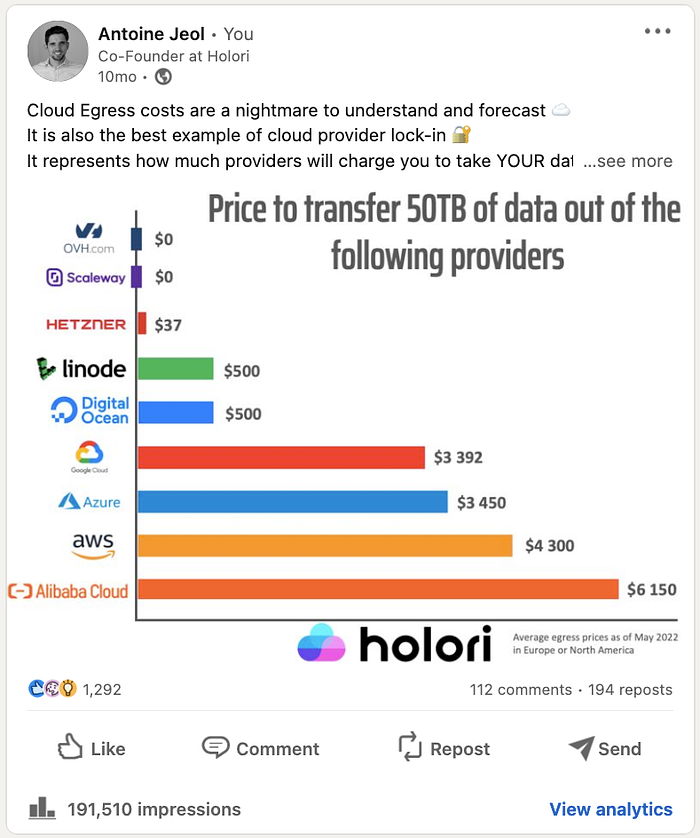
Source: https://medium.com/@alexandre_43174/the-surprising-truth-about-cloud-egress-costs-d1be3f70d001

By the way, what happened to “economies of scale”?

The Cloud Paradox

As you should understand by now topics like costs, lock-in, and failed expectations (technically and commercially) are being discussed for more than a decade already. That is why I highlighted NIST’s sentence above: Cloud portability means that data can be moved from one cloud system to another and that applications can be ported and run on different cloud systems at an acceptable cost.

Acceptable cost.

While the (public) cloud seems to be the right choice for some companies, we now see other scenarios popping up more often: reverse cloud migrations (also called repatriation sometimes)

I have customers who tell me, that the exact same VM with the exact same business logic costs between 5 to 7 times more when they moved it from their private to a public cloud.

Let’s park that and cover the “true costs of cloud” another time. 😀

Public Cloud Services Spend

Looking at Vantage’s report, we can see the following top 10 services on AWS, Azure and GCP ranked by the share of costs:

If they are right and the numbers are true for most enterprises, it means that customers spend most of their money on virtual machines (IaaS), databases, and storage.

What does Gartner say?

Let’s have a look at the most recent forecast called “Worldwide Public Cloud End-User Spending to Reach Nearly $600 Billion in 2023” from April 2023:

Gartner April 2023 Public Cloud Spend Forecast

All segments of the cloud market are expected see growth in 2023. Infrastructure-as-a-service (IaaS) is forecast to experience the highest end-user spending growth in 2023 at 30.9%, followed by platform-as-a-service (PaaS) at 24.1%

Conclusion

If most companies spend around 30% of their budget on virtual machines and Gartner predicts that IaaS is still having a higher growth than SaaS or PaaS, a supercloud architecture for IaaS would make a lot of sense. You would have the same technology format, could use the same networking and security policies, and existing skills, and benefit from many other advantages as well.

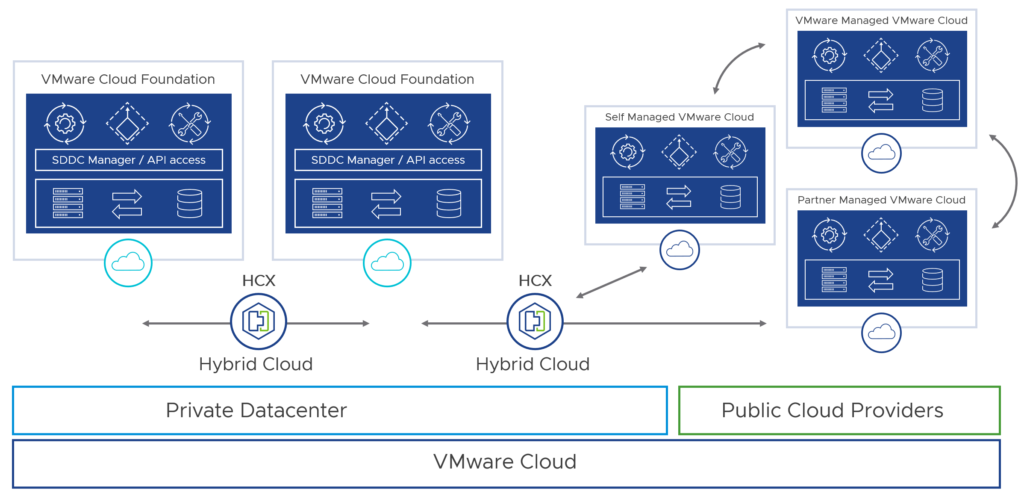
Looking at the VMware Cloud approach, which allows you to run VMware’s software-defined data center (SDDC) stack on AWS, Azure, Google, and many other public clouds, customers could create a seamless hybrid multi-cloud architecture – using the same technology across clouds.

Other VMware products that fall under the supercloud category would be Tanzu Application Platform (TAP), the Aria Suite, and Tanzu for Kubernetes Operations (TKO) which belong to VMware’s Cross-Cloud Services portfolio.

Final Words

I think it is important that we understand, that we are still in the early days of multi-cloud (or when we use multiple clouds).

Customers get confused because it took them years to deploy or move new or existing apps to the public cloud. Now, analysts and vendors talk about cloud exit strategies, reverse cloud migrations, repatriations, exploding cloud costs, and so on.

Yes, a supercloud is about a hybrid multi-cloud architecture and a standardized design for building apps and platforms across cloud. But the most important capability, in my opinion, is the fact that it makes your IT landscape future-ready on different levels with different abstraction layers.
VMware Cloud Foundation 5.0 – Technical Overview

VMware Cloud Foundation 5.0 – Technical Overview

Update: Please have a look at the VMware Cloud Foundation 5.1 Technical Overview.

This technical overview supersedes this version, which was based on VMware Cloud Foundation 4.5, and now covers all capabilities and enhancements that were delivered with VCF 5.0.

What is VMware Cloud Foundation (VCF)?

VMware Cloud Foundation is a multi-cloud platform that provides a full-stack hyperconverged infrastructure (HCI) that is made for modernizing data centers and deploying modern container-based applications. VCF is based on different components like vSphere (compute), vSAN (storage), NSX (networking), and some parts of the Aria Suite (formerly vRealize Suite). The idea of VCF follows a standardized, automated, and validated approach that simplifies the management of all the needed software-defined infrastructure resources.

This stack provides customers with consistent infrastructure and operations in a cloud operating model that can be deployed on-premises, at the edge, or in the public cloud.

What software is being delivered in VMware Cloud Foundation?

The BoM (bill of materials) is changing with each VCF release. With VCF 5.0 the following components and software versions are included:

Note: Only one vCenter Server license is required for all vCenter Servers deployed in a VMware Cloud Foundation system.

VMware Cloud Foundation 5 Overview

What happened to the Tanzu entitlements?

With the release of VCF 5.0, VMware plans to retire the perpetual licensing for VMware Cloud Foundation in Q3 2023.

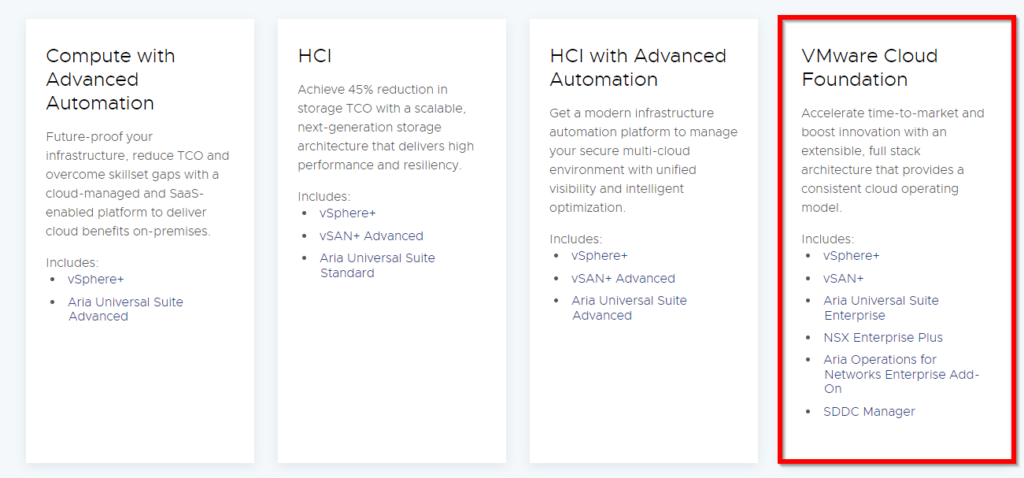
Around the same time, we can expect that VCF is only being sold as part of the “Cloud Packs” (connected and disconnected):

VCF Cloud Pack 

As already mentioned here, customers have also no more option to buy “Tanzu Standard” and existing Tanzu Standard customers can “upgrade” to “Tanzu Kubernetes Grid” (TKG) and Tanzu Mission Control (add-on).

There are several options available. Please contact your VMware representative.

VMware Cloud Foundation Architecture

VCF is made for greenfield deployments (brownfield not supported) and supports two different architecture models:

  • Standard Architecture
  • Consolidated Architecture

VMware Cloud Foundation Deployment Options

The standard architecture separates management workloads and lets them run on a dedicated management workload domain. Customer workloads are deployed on a separate virtual infrastructure workload domain (VI workload domain). Each workload domain is managed by a separate vCenter Server instance, which allows autonomous licensing and lifecycle management.

VMware Cloud Foundation Single Site Deployment

Note: The standard architecture is the recommended model because it separates management workloads from customer workloads.

Customers with a small environment (or a PoC) can start with a consolidated architecture. This allows you to run customer and management workloads together on the same workload domain (WLD).

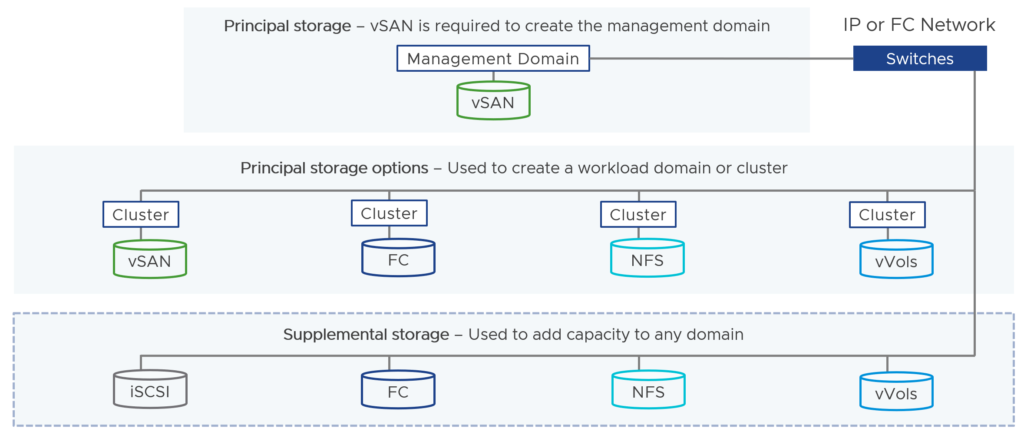
Note: The management workload domain’s default cluster datastore must use vSAN. Other WLDs can use vSAN, NFS, FC, and vVols for the principal storage.

VMware Cloud Foundation Storage Options

What is a vSAN Stretched Cluster?

vSAN stretched clusters extend a vSAN cluster from a single site to two sites for a higher level of availability and inter-site load balancing.

VMware Cloud Foundation Stretched Cluster

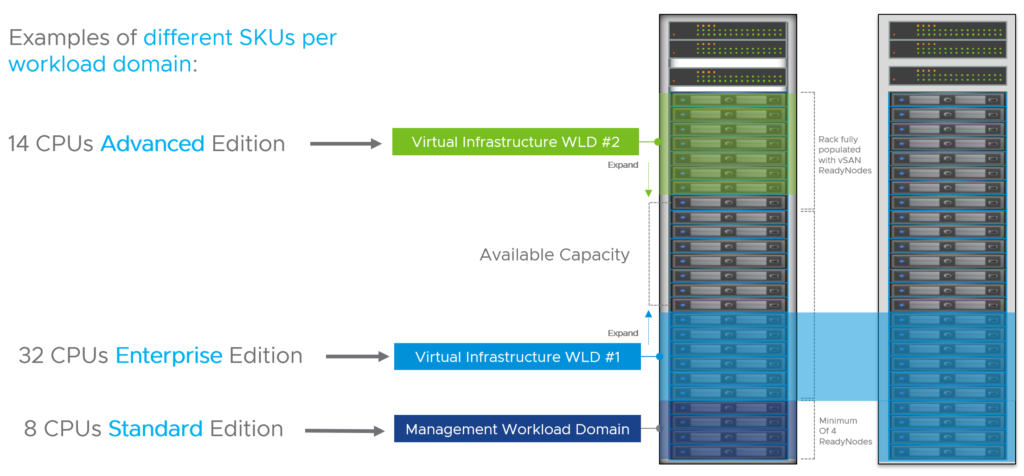
Does VCF provide flexible workload domain sizing?

Yes, that’s possible. You can license the WLDs based on your needs and use the editions that make the most sense depending on your use cases.

VMware Cloud Foundation Flexible Licensing

How many physical nodes are required to deploy VMware Cloud Foundation?

A minimum of four physical nodes is required to start in a consolidated architecture or to build your management workload domain. Four nodes are required to ensure that the environment can tolerate a failure while another node is being updated.

VI workload domains require a minimum of three nodes.

This means, to start with a standard architecture, you need to have the requirements (and money) to start with at least seven physical nodes.

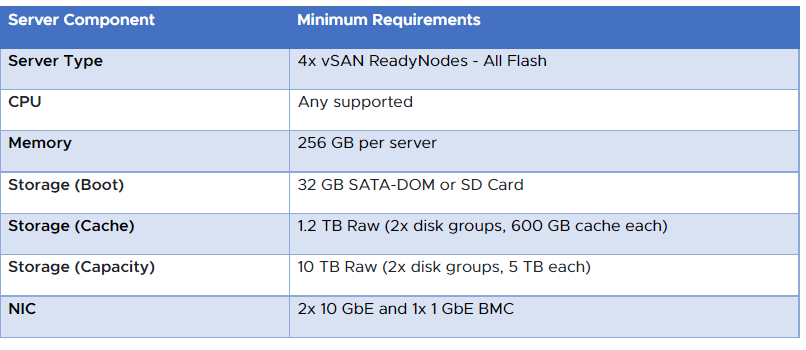
What are the minimum hardware requirements?

These minimum specs have been listed for the management WLD since VCF 4.0 (September 2020):

VMware Cloud Foundation Hardware Requirements

Can I mix vSAN ReadyNodes and Dell EMC VxRail deployments?

No. This is not possible.

What about edge/remote use cases?

When you would like to deploy VMware Cloud Foundation workload domains at a remote site, you can deploy so-called “VCF Remote Clusters”. Those remote workload domains are managed by the VCF instance at the central site and you can perform the same full-stack lifecycle management for the remote sites from the central SDDC Manager.

VMware Cloud Foundation Remote Cluster

Prerequisites to deploy remote clusters can be found here.

Note: If vSAN is used, VCF only supports a minimum of 3 nodes and a maximum of 4 nodes per VCF Remote Cluster. If NFS, vVOLs or Fiber Channel is used as principal storage, then VCF supports a minimum of 2 and a maximum of 4 nodes.

Important: Remote clusters and remote workload domains are not supported when VCF+ is enabled.

Does VCF support HCI Mesh?

Yes. VMware Cloud Foundation 4.2 and later supports sharing remote datastores with HCI Mesh for VI workload domains.

HCI Mesh is a software-based approach for disaggregation of compute and storage resources in vSAN. HCI Mesh brings together multiple independent vSAN clusters by enabling cross-cluster utilization of remote datastore capacity within vCenter Server. HCI Mesh enables you to efficiently utilize and consume data center resources, which provides simple storage management at scale.

Note: At this time, HCI Mesh is not supported with VCF ROBO.

What is SDDC Manager?

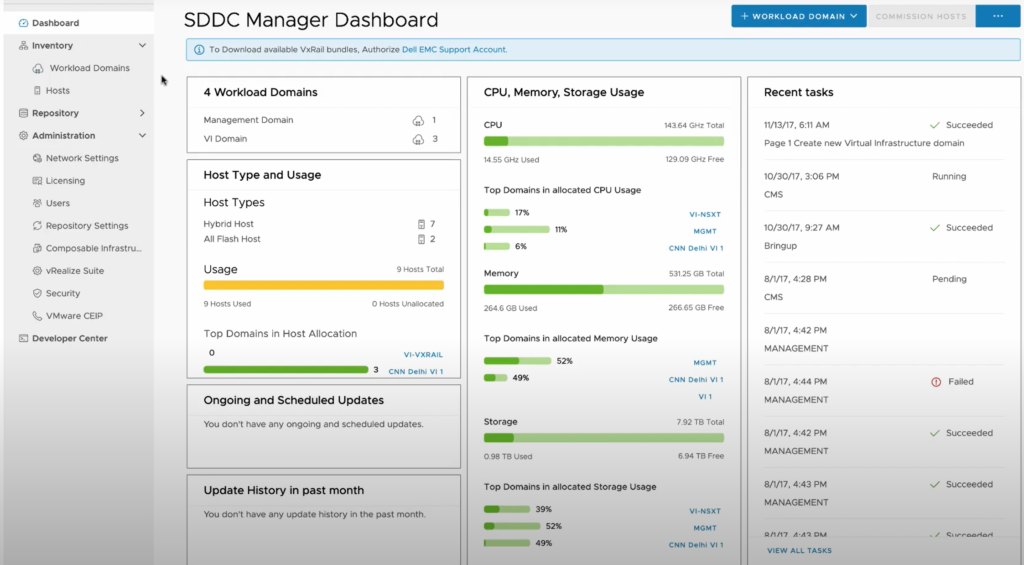
SDDC Manager is a preconfigured virtual appliance that is deployed in the management workload domain for creating workload domains, provisioning additional virtual infrastructure and lifecycle management of all the software-defined data center (SDDC) management components.

VMware Cloud Foundation SDDC Manager

You use SDDC Manager in VMware Cloud Foundation to perform the following operations:

  • Commissioning or decommissioning ESXi hosts
  • Deployment of workload domains
  • Extension of clusters in the management and workload domains with ESXi hosts
  • Adding clusters to the management domain and workload domains
  • Support for network pools for host configuration in a workload domain
  • Product licenses storage
  • Deployment of vRealize Suite components.
  • Lifecycle management of the virtual infrastructure components in all workload domains, and of vRealize Suite Lifecycle Manager components.
  • Certificate management
  • Password management and rotation
  • NSX-T Edge cluster deployment in the management domain and workload domains
  • Backup configuration

VMware Cloud Foundation SDDC Manager Dashboard

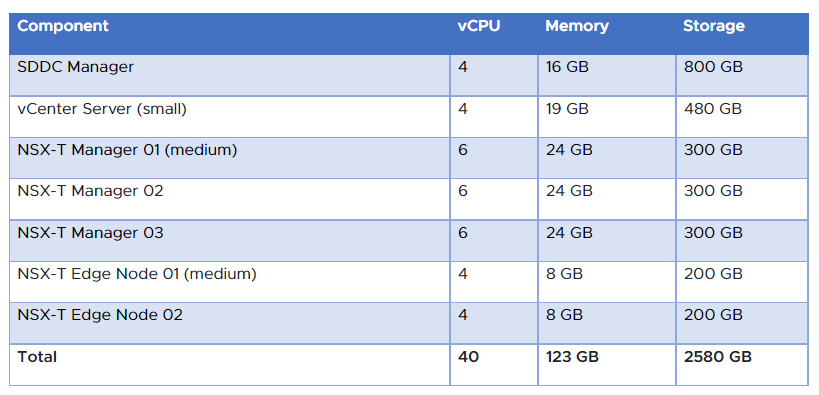
How many resources does the VCF management WLD need during the bring-up process?

We know that VCF includes vSphere (ESXi and vCenter), vSAN, SDDC Manager, NSX-T and eventually some components of the vRealize Suite. The following table should give you an idea what the resource requirements look like to get VCF up and running:

VMware Cloud Foundation Resource Requirements

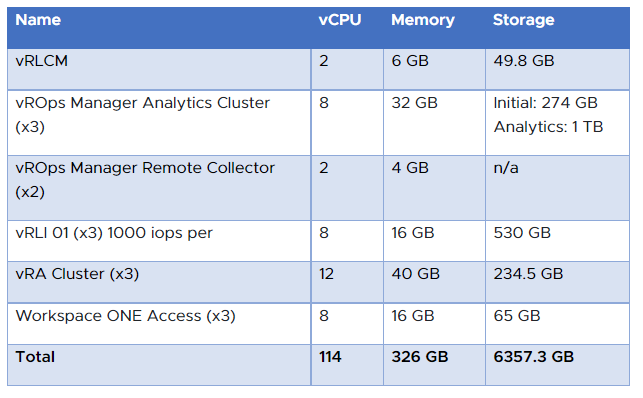
If you are interested to know how many resources the Aria Suite (formerly vRealize Suite) will consume of the management workload domain, have a look at this table:

VMware Cloud Foundation Resource Requirements vRealize

How can I migrate my workloads from a non-VCF environment to a new VCF deployment?

VMware HCX provides a path to modernize from a legacy data center architecture by migrating to VMware Cloud Foundation.

VMware Cloud Foundation HCX

    Can I install VCF in my home lab?

    Yes, you can. With the VLC Lab Constructor, you can deploy an automated VCF instance in a nested configuration. There is also a Slack VLC community for support.

    VCF Lab Constructor

    Note: Please have a look at “VCF Holodeck” if you would like to create a smaller “sandbox” for testing or training purposes.

    Where can I find more information about VCF?

    Please consult the VMware Foundation 5.0 FAQ for more information about VMware Cloud Foundation.


    VMware Tanzu Licensing – What’s New?

    VMware Tanzu Licensing – What’s New?

    Last year, VMware gave the Tanzu portfolio a fairly good facelift with all the announcements from VMware Explore 2022. It is clear to me that VMware focuses on multi-cluster and multi-cloud Kubernetes management capabilities (Tanzu for Kubernetes Operations) and a superior developer experience with any Kubernetes on any cloud (Tanzu Application Platform). VMware embraces native public clouds and so it was very exciting for many customers when they announced the lifecycle management of Amazon Elastic Kubernetes Service (EKS) clusters – the direct provisioning and management of EKS clusters with Tanzu Mission Control. But what happened in the last 6 to 9 months since VMware Explore US and Europe? And how do I get parts of the VMware Tanzu portfolio nowadays?

    Tanzu Licensing

    Let us start with licensing first. in October 2022, VMware made it clear that they do not want to move forward anymore with the Tanzu Basic and Advanced editions, only Tanzu Standard was left. VMware replaced Tanzu Basic with “Tanzu Kubernetes Grid” (TKG), which comes with the following components:

    • vSphere capabilities / K8s Runtime
    • K8s Cluster Lifecycle Management – Cluster API
    • Image Registry – Harbor
    • Container Networking – Antrea/Calico
    • Load Balancing – NSX Advanced Load Balancer
    • Ingress Controller – Contour
    • Observability – Fluent Bit, Prometheus, Grafana
    • Operating System – Photon OS, Ubuntu, bring-your-own node image
    • Data Protection – Velero

    Note: Nothing is official yet, but according to this article intended for partners, VMware is going to announce the Tanzu Standard EOA (End of Availability) soon:

    …containing updated information on Tanzu Standard entering end of availability (EOA) and the new Tanzu Kubernetes Operations and Tanzu Application Platform partner resources.

    Looking at the “Tanzu Explainer” and its changelog from the 5th of May, one can find the following: “Updated to reflect new Tanzu for Kubernetes Operations SKUs“.

    Tanzu for Kubernetes Operations Bundles

    The Tanzu Explainer on Tech Zone lists the following new bundles/packages for Tanzu for Kubernetes Operations (TKO):

    1. Tanzu for Kubernetes Operations Foundation includes Tanzu Mission Control Advanced and Tanzu Service Mesh Advanced. Two add-on SKUs are available—one adds Antrea Advanced and Aria Operations for Applications, the other adds these plus NSX Advanced Load Balancer Enterprise. Tanzu Kubernetes Grid is not included in this bundle.
    2. Tanzu for Kubernetes Operations includes Tanzu Kubernetes Grid, Tanzu Mission Control Advanced, Tanzu Service Mesh Advanced, Antrea Advanced, and Aria Operations for Applications.
    3. Tanzu for Kubernetes Operations with NSX Advanced Load Balancer includes Tanzu Kubernetes Grid, Tanzu Mission Control Advanced, Tanzu Service Mesh Advanced, Antrea Advanced, Aria Operations for Applications, and NSX Advanced Load Balancer Enterprise.

    Note: Since Tanzu Mission Control Standard (TMC) was only sold as part of the Tanzu Standard Edition, we see VMware moving forward with TMC Advanced only. Which is good! But TMC Essentials still comes with vSphere+ and VMC on AWS.

    Tanzu Entitlements with vSphere and VMware Cloud Foundation Editions

    What about vSphere and VMware Cloud Foundation (VCF)? Let me give you an overview here as well:

    • vSphere+ Standard – No Tanzu entitlements included
    • vSphere+ – Includes TKG and TMC Essentials
    • vSphere Enterprise+ with TKG – Includes TKG
    • VMware Cloud Foundation – All VCF editions have Tanzu Standard included

    Note: We do not know yet what the Tanzu Standard EOA means for the Tanzu entitlements with VCF. Need to wait for guidance.

    VMware Cloud Packs

    In April 2023, VMware introduced new bundles called VMware Cloud Packs and they come in four different flavours:

    1. Compute with Advanced Automation. vSphere+ and Aria Universal Suite Advanced
    2. HCI. vSphere+, vSAN+ Advanced and Aria Universal Suite Standard
    3. HCI with Advanced Automation. vSphere+, vSAN+ Advanced and Aria Universal Suite Advanced
    4. VMware Cloud Foundation. vSphere+, vSAN+ Enterprise, NSX Enterprise Plus, SDDC Manager, Aria Universal Suite Enterprise, Aria Operations for Networks Enterprise add-on

    In addition to these four Cloud Packs offerings, customers can get the following add-ons:

    • Data Protection & Disaster Recovery
    • Network Detection and Response
    • Tanzu Mission Control
    • Ransomware Recovery
    • Advanced Load Balancer
    • Workload and Endpoint Security
    • Intrusion Detection and Prevention
    • VDI/Desktops

    Note: As you can see, all new cloud packs have TKG included and TMC is an add-on. vCenter Standard is with connected and disconnected subscriptions.

    Important: Please note as well that the individual components of the bundles cannot be upgraded independently. Example – Aria Universal Suite Standard as part of the HCI Cloud Pack cannot be upgraded to Aria Universal Suite Enterprise.

    Conclusion

    VMware is clearly moving in the right direction: They want to simplify their portfolio and improve how customers can consume/subscribe services. As always, it is going to take a while until they have figured out which bundles and product versions make sense for most of the customers. Be patient. 🙂


    VMware Cloud on Equinix Metal – The New Intercloud?

    VMware Cloud on Equinix Metal – The New Intercloud?

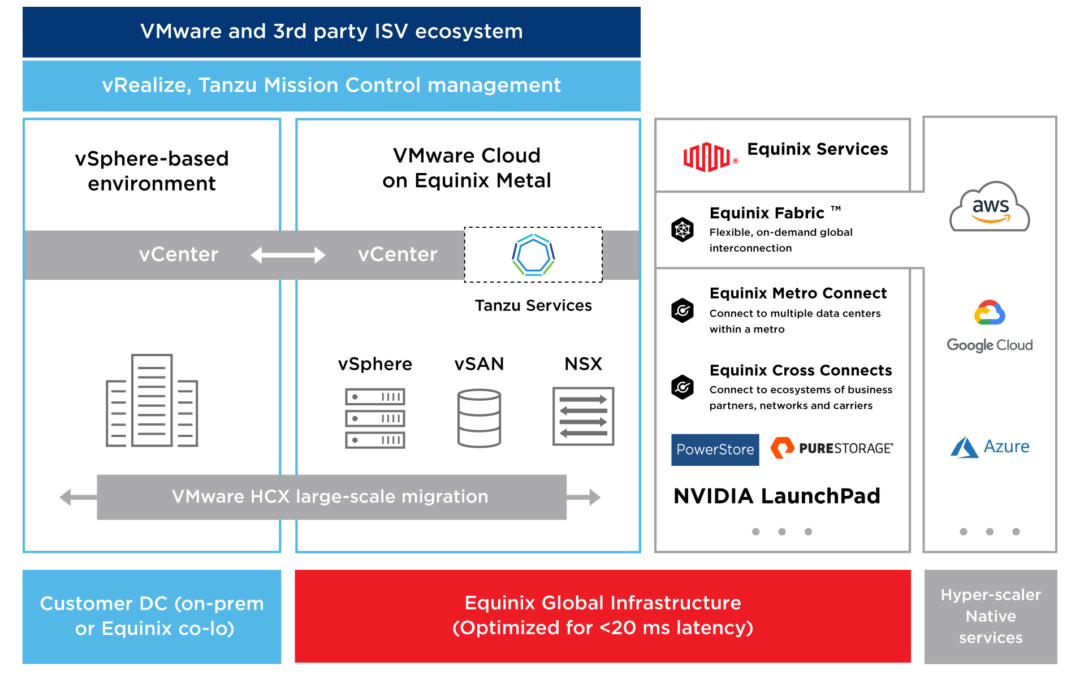
    It was November 2022 when VMware and Equinix announced an expanded partnership to deliver new infrastructure and multi-cloud services. Called VMware Cloud on Equinix, this solution combines VMware Cloud Infrastructure-as-a-Service (IaaS) with Equinix Metal Hardware-as-a-Services (HWaaS) independently. In other words, the SDDC (software-defined data center) stack is sold by VMware, and HWaaS is sold by Equinix. Looking at this partnership and solution, one could say that Equinix might become “the” intercloud in this multi-cloud era.

    What is VMware Cloud on Equinix Metal (VMC-E)?

    VMC-E combines VMware’s managed and supported cloud IaaS with Equinix’s baremetal-as-a-service (BMaaS) offering. This gives enterprises the advantage to run this cloud offering almost everywhere globally. Another benefit is that VMC-E will be available in over 30 of the most interconnected global Equinix locations, connected to all the major public clouds and networks (Equinix Fabric).

    Equinix Multi-Cloud App

    What is Equinix Fabric?

    This service allows organizations to connect to other Equinix customers and other internet resources like service providers:

    • Amazon Web Services (AWS)
    • Microsoft Azure
    • Google Cloud
    • Oracle Cloud
    • Alibaba Cloud
    • IBM Cloud
    • and many more

    For me, Equinix Fabric is an interesting way to interconnect different VMware-based Clouds like VMware Cloud on AWS, Azure VMware Solution, Google Cloud VMware Engine, Alibaba Cloud VMware Solution, or Oracle Cloud VMware Solution.

    VMC-E for multi-cloud apps?

    A lot of enterprises are not “cloud-first” anymore, they became “cloud-smart”. They put the right apps in the right cloud based on the right reasons.

    VMware Cloud-Smart

    VMC-E has the potential to become a true multi-cloud enabler by letting VMware and Equinix customers move their applications to an ideal place. Imagine lifting and shifting a legacy application to VMC-E. This application then sits in the middle of all major clouds and customers can use different services and components for the same application. This is my definition of a multi-cloud app.

    Multi-Cloud App on VMC-E

    What are the use cases?

    VMware and Equinix mention distributed environments and mission-critical applications that rely on high-performance network bandwidth and low latency, such as smart cities, video analytics, game development, VDI, real-time financial market trading, retail POS, IoT, and machine learning.

    Which hosts are available?

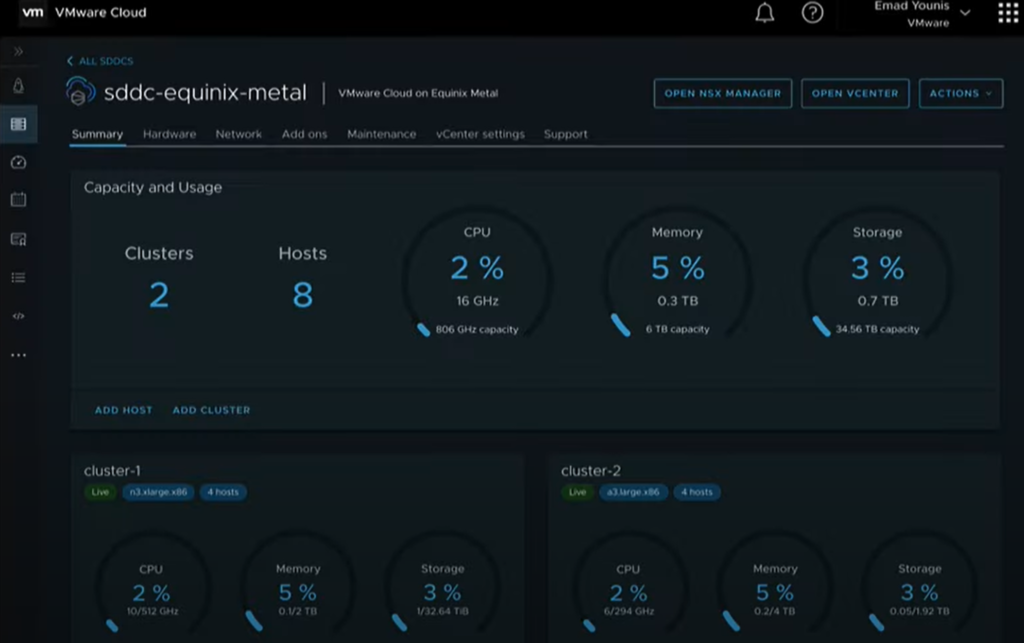
    VMware Cloud on Equinix Metal comes with multiple host configs that can be found here. It is not clear yet which host type(s) will be available during the initial lunch. But the tech preview on YouTube shows the “n3.xlarge.x86” instance type.

    Tech Preview VMware Cloud on Equinix Metal - YouTube

    How can I get VMC-E?

    VMC-E is currently in an early access phase for selected customers in H1 2023.

    Tech Preview VMware Cloud on Equinix Metal

    Where can I get more information?

    To learn more and to participate in the early access program for VMware Cloud on Equinix Metal, please email your interest to  .

    10 More Things You Didn’t Know About vSphere+

    10 More Things You Didn’t Know About vSphere+

    A few months ago I wrote the article 10 Things You Didn’t Know About vSphere+, which gives you a good overview of vSphere+ and VCF+, and some information about licensing. A few things have changed and been added since then and I would like to share some of the information with you.

    1) vSphere+ Standard Edition

    Some customers only need the feature set of vSphere Standard but were very interested in having the benefits that come with the (VMware) cloud connectivity. VMware listened to its customers and introduced vSphere+ Standard back in December 2022. What is included?

    • vSphere Standard features
    • vCenter Standard (unlimited number of deployments)
    • Admin Services (Cloud Console)

    2) vSAN+ Standard and Advanced Edition

    To mirror the vSAN perpetual license editions, VMware released vSAN+ Standard and vSAN+ Advanced in December 2022 as well.

    3) Grace Period when moving from perpetual to subscription licensing

    Customers need to move their existing perpetual licenses within 90 days to vSphere+/vSAN+, see here.

    If Customer receives its entitlement to vSphere+ or vSAN+ through a VMware subscription upgrade program, then Customer must, within 90 days after purchase of the entitlement, relinquish its entitlements to any relevant vSphere or vSAN on-premises perpetual licenses (as applicable) that were exchanged through the subscription upgrade program (“Exchanged Licenses”).

    5) What if I don’t renew my vSphere+/vSAN+ subscription?

    You will be out of compliance, but your environment is still going to work. And you will not receive support from VMware’s Global Support anymore during that time.

    6) Which data is transmitted to VMware Cloud?

    According to this article, the following data is transmitted:

    • vCenter Server Inventory (transmission frequency: 24h)
    • Log Data (transmission frequency: continuous)
    • Performance Data (transmission frequency: 5min)
    • Consumption Data (transmission frequency: 15min)
    • Feature Usage (transmission frequency: 5min)
    • Entitlement (transmission frequency: as necessary)

    7) Aria Universal Suite & vSphere+ (vCloud Suite+)

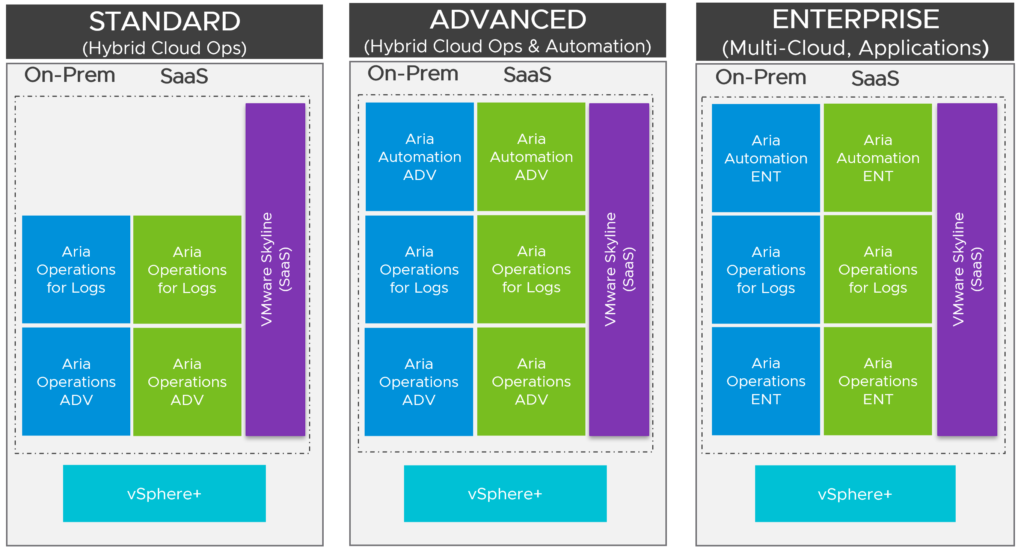
    The subscription version of vCloud Suite is vCloud Suite+ (vCS+). vCS+ comes also in three editions: Standard, Advanced, Enterprise

    vCloud Suite+ Editions 2023

    8) What about VMware Horizon and vSphere+?

    If you are using vSphere (for Desktop) that came as a bundle with VMware Horizon, then vSphere cannot be upgraded to vSphere+. Consult the product interoperability matrix for more information. If you are using Horizon as a standalone product on top of vSphere+, I don’t see any issues.

    9) What are vSphere+ add-on services?

    Currently, vSphere+ comes with a centralized cloud console that provides consolidated management of all vSphere+ deployments. Customers also get the Cloud Consumption Interface (CCI) and Tanzu Mission Control Essentials as part of vSphere+.

    Add-On #1: Aria Operations

    vSphere+ vROps Add-On

    Powered by Aria Operations (formerly known as vRealize Operations), vSphere+ provides an overview of the resource usage of all the clusters associated with the vCenter Server instances that are connected to your vCenter Cloud Gateway(s). You can monitor and analyze details such as hosts, cores, VMs, and remaining capacity on each cluster. You can also get a view of the number of days remaining until the cluster reaches its usable capacity.

    Add-On #2: VMware Cloud Disaster Recovery (VCDR)

    vSphere+ VCDR Add-On

    You can protect VMs and manage their protection status directly from the VMware Cloud Console if you have a VCDR subscription.

    Future Add-Ons

    Without making any commitment and knowing the vSphere+ roadmap, it seems that VMware is going to bring parts of the VMware Data Services portfolio as an add-on service. More information can be found here.

    10) Counting Cores for vSphere+ and vSAN+ Licensing

    VMware has created a tool to identify the number of core licenses that are required to upgrade existing vSphere/vSAN deployment to vSphere+/vSAN+. William Lam has created two blogs that should help you using the script:


    VMware vSphere – The Enterprise Data Platform

    VMware vSphere – The Enterprise Data Platform

    The world is creating and consuming more data than ever. There are multiple reasons that can explain this trend. Data creates the foundation for many digital products and services. And we read more and more about companies that want or need to keep their data on-premises because of reasons like data proximity, performance, data privacy, data sovereignty, data security, and predictable cost control. We also know that the edge is growing much faster than large data centers. These and other factors are the reasons why CIOs and decision-makers are now focusing on data more than ever before.

    We live in a digital era where data is one of the most valuable assets. The whole economy from the government to local companies would not be able to function without data. Hence, it makes sense to structure and analyze the data, so a company’s data infrastructure becomes a profit center and is not just seen as a cost center anymore.

    Data Sprawl

    A lot of enterprises are confronted with the so-called data sprawl. Data sprawl means that an organization’s data is stored on and consumed by different devices and operating systems in different locations. There are cases where the consumers and the IT teams are not sure anymore where some of the data is stored and how it should be accessed. This is a huge risk and results in a loss of security and productivity.

    Since the discussions about sovereign clouds and data sovereignty have started, it has never been more important where a company’s data resides, and where and how one can consume that data.

    Enterprises have started to follow a cloud-smart approach: They put the right application and its data in the right cloud, based on the right reasons. In other words, they think twice now where and how they store their data.

    What databases are popular?

    When talking to developers and IT teams, I mostly received the following names (in no particular order):

    • Oracle
    • MSSQL
    • MySQL
    • PostgreSQL

    I think it would be a fair statement to make that a lot of customers are looking for alternatives to reduce expensive database and database management solutions (DBMS). It seems that Postgres and MySQL earned a lot of popularity over the past years, while Oracle is still considered one of the best databases on the market – even seen as one of the most expensive and least liked solutions. But I also hear other solutions like MongoDB, MariaDB, and Redis mentioned in more discussions.

    DBaaS and Public Cloud Characteristics

    It is nothing new: Developers are looking for a public-cloud-like experience for their on-premises deployments. They want an easy and smooth self-service experience without the need for opening tickets and waiting for several days to get their database up and running. And we also know that open-source and freedom of choice are becoming more important to companies and their developers. Some of the main drivers here are costs and vendor lock-in.

    IT teams on the other side want to provide security and compliance, more standardization around versions and types, and an easy way to backup and restore databases. But the truth is, that a lot of companies are struggling to provide this kind of Database-as-a-Service (DBaaS) experience to their developers.

    The idea and expectation of DBaaS are to reduce management and operational efforts with the possibility to easily scale databases up and down. The difference between the public cloud DBaaS offering and your on-premises data center infrastructure is the underlying physical and virtual platform.

    On-premises it could be theoretically any hardware, but VMware vSphere is still the most used virtualization platform for an enterprise’s data (center) infrastructure.

    VMware vSphere and Data

    VMware shared the information that studying their telemetry from their customer base showed that almost 25% of VMware workloads are data workloads (databases, data warehouses, big data analytics, data queueing, and caching) and it looks like that MS SQL Server still has the biggest share of all databases that are hosted on-premises.

    They are also seeing a high double-digit growth (approx. 70-90%) when it comes to MySQL and steady growth with PostgreSQL. Rank 4 is probably Redis followed by MongoDB.

    VMware Data Solutions

    VMware Data Solutions, formerly known as Tanzu Data Services, is a powerful part of the entire VMware portfolio and consists of:

    • VMware GemFire – Fast, consistent data for web-scaling concurrent requests fulfills the promise of highly responsive applications.
    • VMware RabbitMQ – A fast, dependable enterprise message broker that provides reliable communication among servers, apps, and devices.
    • VMware Greenplum – VMware Greenplum is a massively parallel processing database. Greenplum is based on open-source Postgres, enabling Data Warehousing, aggregation, AI/ML and extreme query speed.
    • VMware SQL – VMware’s open-source SQL Database (Postgres & MySQL) is a Relational database service providing cost-efficient and flexible deployments on-demand and at scale. Available on any cloud, anywhere.
    • VMware Data Services Manager – Reduce operational costs and increase developer agility with VMware Data Services Manager, the modern platform to manage and consume databases on vSphere.

    VMware Data Services Manager and VMware SQL

    VMware SQL allows customers to deploy curated versions of PostgreSQL and MySQL and DSM is the solution that enables customers to create this DBaaS experience their developers are looking for.

    VMware DSM Personas

    Data Services Manager has the following key features:

    • Provisioning – Provision different configurations of databases (MySQL, Postgres, and SQL Server) with either freely
      configurable or pre-defined sizing of compute and memory resources, depending on user permissions
    • Backup & Restore – Backup, Transactional log, Point in Time Recovery (PiTR), on-demand or as scheduled
    • Scaling – Modify instances depending on usage (scale up, scale down, disk extension)
    • Replication – Replicate (Cold/Hot or Read Replicas) across managed zones
    • Monitoring – Monitor database engine, vSphere infrastructure, networking, and more.

    …and supports the following components and versions (with DSM v1.4):

    • MySQL 8.0.30
    • Postgres 10.23.0, 11.18.0, 12.13.0, 13.9.0
    • MSSQL Server 2019 (Standard, Developer, Enterprise Edition)

    Companies with a lot of databases have now a way at least to manage, control and secure Postgres, MySQL and MSSQL DB instances from a centralized tool than can be accessed via the UI or API.

    Project Moneta

    VMware’s vision is to become the cloud platform of choice. What started with compute, storage and network, continues with data: make it as easy to consume as the rest of their software-defined data center stack.

    VMware has started with DSM and sees Moneta, which is still an R&D project, as the next evolution. The focus of Moneta is to bring better self-service and programmatic consumption capabilities (e.g., integration with GitHub).

    Project Moneta will provide native integration with vSphere+ and the Cloud Consumption Interface (CCI). While nothing is official yet, I think of it as a vSphere+ and VMware Cloud add-on service that would provide data infrastructure capabilities. 

    Final Words

    If your developers want to use PostgreSQL, MySQL and MSSQL, and if your IT struggles to deploy, manage, secure and backup those databases, then DSM with Tanzu SQL can help. Both solutions are also perfectly made for disconnected use cases or airgapped environments.

    Note: The DB engines are certified, tested and supported by VMware.